

TenTin
Known Participant
October 27, 2025
Answered

Audio Track Customization

  • October 27, 2025
  • 1 reply
  • 199 views

Is it possible to remove default audio track indicators, such as keyframe and sync, while only displaying the 'S' (Solo) and 'M' (Mute) options?

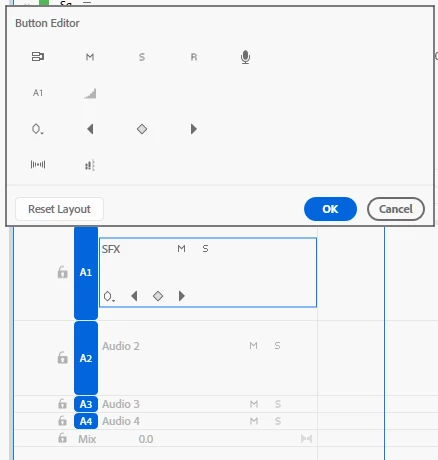
I’ve tried dragging them out of the box, but nothing happens; I can only rearrange them. I would like to have just the audio track name, along with the Solo and Mute options, even when I resize the track height.
 

Correct answer Stan Jones

@TenTin,


Just drag them from the header area itself out. I get a "not allowed" circle indicator, but they are removed. 


With the wrench icon, turn on audio name, and be sure to turn on the show audio header with small tracks option.


Does that work?


I'm Win11 on PR 25.5.0.


Stan


1 reply

Stan Jones
Community Expert
Stan JonesCommunity ExpertCorrect answer
Community Expert
October 27, 2025

@TenTin,


Just drag them from the header area itself out. I get a "not allowed" circle indicator, but they are removed. 


With the wrench icon, turn on audio name, and be sure to turn on the show audio header with small tracks option.


Does that work?


I'm Win11 on PR 25.5.0.


Stan


TenTin
TenTinAuthor
Known Participant
October 27, 2025

Thanks. Yes, it did cheat. I thought it wouldn't allow me to take them out, but it does. If I change the arrangement, will this new arrangement apply to all new project files or just to the current one? I mean, can I make my new arrangement as the default for all new project files?

Stan Jones
Community Expert
Community Expert
October 27, 2025

@TenTin,


> will this new arrangement apply to all new project files or just to the current one? I mean, can I make my new arrangement as the default for all new project files?

I found that it was persistent for all projects, new and old, even after restarting PR. I did not see a way to save a custom header. Anyone?


But I also found that, the reason I could not get it to work right away before, is that dragging an icon out does NOT work for me, until I clicked Reset; then I could remove icons. Otherwise, the only ones I could remove were ones I adding during that customization session.


That seems odd.


Stan