
Participant
February 23, 2019
Answered

Audio track gets muted when it gets to a certain point

  • February 23, 2019
  • 2 replies
  • 642 views

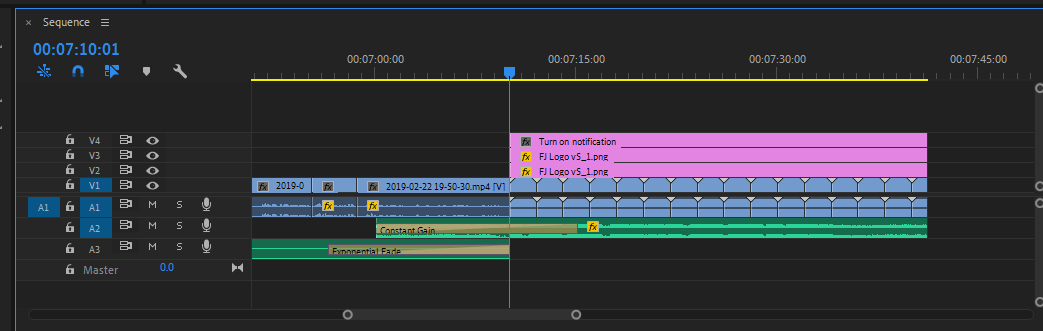
Audio Track 2 does a constant gain until it gets to this point where I have some other video tracks playing. I tried moving around the audio track but it always gets muted when it gets to the 7:10. Something at that point is causing the audio track to mute.

Take a look at the screenshot.
This topic has been closed for replies.
Correct answer gretchenf

After looking around online for answers, it turns out there may be a bug in premiere. Some effect on the video track was causing the audio to mute. I removed the video and added it back in, and it worked just fine.

2 replies

gretchenfAuthorCorrect answer
Participant
February 23, 2019

After looking around online for answers, it turns out there may be a bug in premiere. Some effect on the video track was causing the audio to mute. I removed the video and added it back in, and it worked just fine.

Participant
April 23, 2023

Hi - I have the same exact problem with a random audio clip automatically muted.  Is this bug still not resoloved? I have checked key frame and rebooted PC several time. If there is any solution, it would be greatly apprecaited. 

Legend
February 23, 2019

Check your Track Volume Keyframes.