
Participating Frequently
July 11, 2021
Answered

audio tracks

  • July 11, 2021
  • 1 reply
  • 740 views

I have a clip dating from last month used in a completed project. In that project the clip appears with one video track and one audio track on the timeline. Today, starting another project I import that clip and it appears with one video track and six audio tracks on my timeline. Why is that, and also I would like to know if there is a preference somewhere that will allow me to merge all multiple audio tracks into one
I am on Win10, using Premiere Pro v 14.9.0
This topic has been closed for replies.
Correct answer Ann Bens

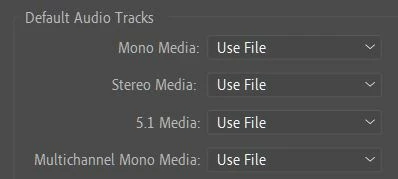
Here are my preferences. What do I change?


I am guessing multichannel to stereo.

1 reply

Ann Bens
Community Expert
Community Expert
July 11, 2021

There is a preference on how you would like audio to be imported.

Preferences > Timeline > Default audio tracks.

Participating Frequently
July 11, 2021

Thanks for your response, but something escapes me....I don't know much about audio.....

no matter what preference I choose for the timeline, I still have 6 audio tracks. What should I do to have a single audio track

Ann Bens
Community Expert
Community Expert
July 11, 2021

You set the preference before import. It does not work if the footage is already imported.

If its already in the project you will have to use Modify > Audio Channels.