January 1, 2017
Answered

Audio tracks gets muted for no reason

  • January 1, 2017
  • 1 reply
  • 968 views

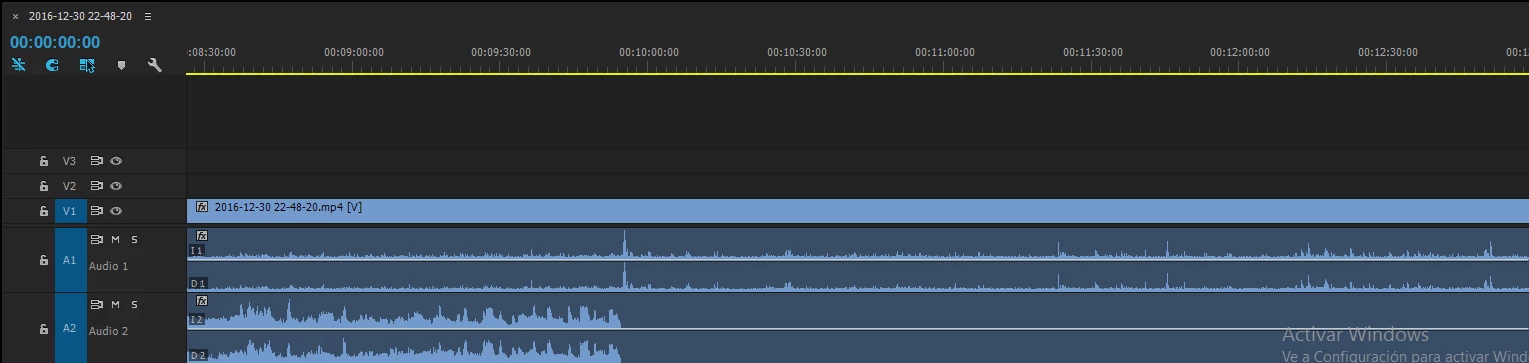
So I was trying to put some clips together but I found out that sometimes the audio gets muted for no reason. When I open the clips without premiere, the sound is just ok. The first audio track is my microphone, which in this video it doesn't gets muted but it does on another. The second audio track is the one that has the problem. The audio works perfectly but then after a few minutes it gets completely muted.
    This topic has been closed for replies.
    Correct answer Vidya Sagar

    Hi Javigamo,

    Please clear the Media cache & test the audio.

    FAQ: How to clean media cache files

    Please let us know the status.

    Thanks,

    Vidya Sagar.

    1 reply

    Vidya Sagar
    Vidya SagarCorrect answer
    Participating Frequently
    January 2, 2017

    Hi Javigamo,

    Please clear the Media cache & test the audio.

    FAQ: How to clean media cache files

    Please let us know the status.

    Thanks,

    Vidya Sagar.

    January 2, 2017

    yes, now it's working. Thank you so much for the answer!

    Participant
    March 16, 2017

    I HAVE HAD SAME ISSUE BUT CANNOT FIND CACHE FILES.  THE LOCATION IN FAQ DOES NOT EXIST.  I HAVE NO 'COMMON 'FOLDER IN ADOBE FOLDER.  I AM RUNNING OS 10.12.3 & PP CC 2017.0.2.  SOMETIMES IF I RESTART PP AUDIO RETURNS BUT THAT'S NOT AN ACCEPTABLE WORK AROUND FOR AN EDIT SESSION AND IT DOES NOT ALWAYS DO THE THE TRICK.  WHERE CAN I FIND THE CACHE FILES?