GravenDarken
Known Participant
October 12, 2018
Question

Audio very glitchy and repeats.

  • October 12, 2018
  • 3 replies
  • 2210 views

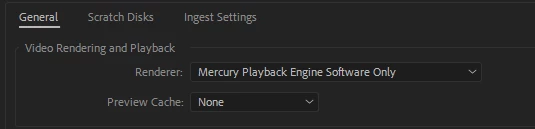
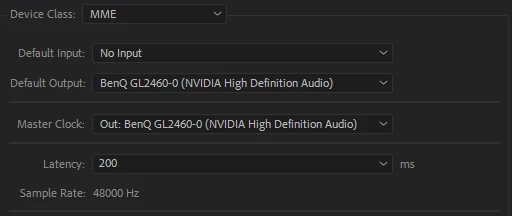
I downloaded a youtube video into mp4 format using a free online converter. I then imported it onto adobe premiere pro to edit it and turn the edited file into mp3. Now when I want to edit this mp3 file further, the audio is very "glitchy" and skips and repeats itself like a scratchy CD disc. The file itself is fine when I play it in windows media player, it is only "glitchy "when I put it into adobe premiere pro. My audio hardware settings for "Default Input" is set to "no input" my project settings > general > video rendering & playback is set to "mercury playback software only". I've looked online everywhere for a solution and tried everything nothing seems to work. I also can't convert it into wav file using adobe audition because the software I'm using the file for only accepts mp3's.
This topic has been closed for replies.

3 replies

Participant
October 12, 2018

My issue with this is that whenever I import a file (.mpg) into premiere pro, it is just repeating the first seconds for the entire duration of the video. After sometime, it'll extend to other parts of the audio but continues to repeat.

Ann Bens
Community Expert
Community Expert
October 12, 2018

Do you have any other settings to choose from in the Audio Hardware default output?

Participant
October 12, 2018

I'm thinking this may be an issue with the file type itself? Does premiere pro not work well with .mpg? I tried an .mp4 file, it's fine.

Ann Bens
Community Expert
Community Expert
October 12, 2018

I then imported it onto adobe premiere pro to edit it and turn the edited file into mp3.

That is where you went wrong: should have saved is a wave.

GravenDarken
Known Participant
October 12, 2018

The software im using only accepts mp3 though. So I saved the edited file as mp3 because wav will not work. Now when I go to edit the file some more the audio is a disaster. Is there anything I can do?

Ann Bens
Community Expert
Community Expert
October 12, 2018

What software is that?

Community Expert
October 12, 2018

Convert to wav, edit in Premiere or Audition then export it as MP3

GravenDarken
Known Participant
October 12, 2018

Oh so the only solution involves me spending more money.. Why is it glitchy to begin with? When I first edited the files they played just fine, now all of a sudden they are all glitchy and now I have to spend more money on more software when adobe premiere pro should be all I need and it should work as intended. There should be a fix in adobe premiere pro and I shouldn't have to download anything else.

Participant
October 12, 2018

I am having the exact same issue right now! Been trying to figure it out for the past hour.