
Participant
February 4, 2025
Question

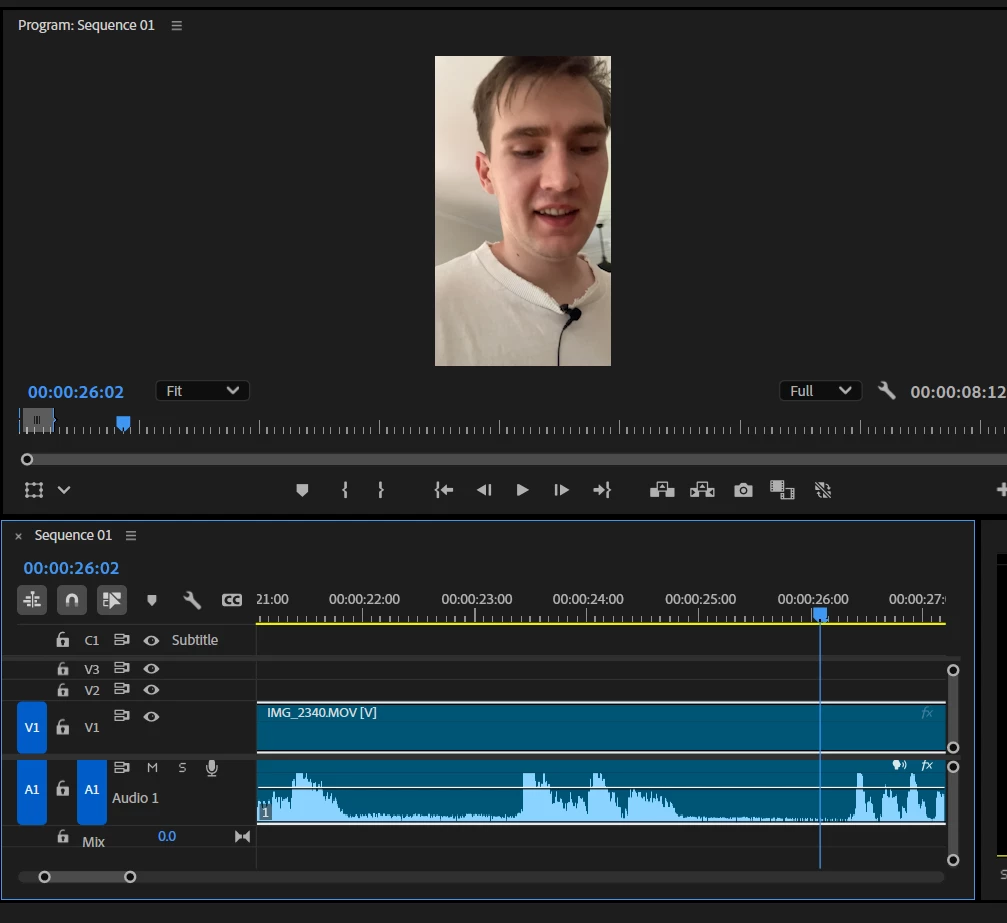
audio waveforms aren't showing the maximum peak level

  • February 4, 2025
  • 3 replies
  • 326 views

Hi, I'm having trouble editing sound with two different microphones as the audio is hard to cut because I can't find the exact positioning of the word for subtitles in the timeline in premiere pro. Is this a microphone issue or is it the software and how to fix? Problem number 2, my audio waveforms aren't showing the maximum peak level and seem to be cut off at the top. 
3 replies

Community Expert
February 4, 2025

Clipped audio occurs when the recording level exceeds the maximum limit, causing distortion. This can happen either during recording or if the gain is set too high in Premiere Pro.


To reduce the audio level, try one of the following methods:

  • Select the clip and go to Clip > Audio Options > Audio Gain. Lower the Set Gain To value to reduce the volume.
  • For an automatic adjustment, open Window > Essential Sound and click Auto-Match.


It looks like you are working with a stereo clip. If each channel has a separate speaker, you may need to convert it to a mono clip. This video explains the process: Convert stereo to mono in Premiere Pro.


For subtitles, Premiere Pro offers an automated workflow. You can find more details here: Working with captions in Premiere Pro.

Participant
February 4, 2025

Hi thanks for responding! What do you mean by clipped? 

Kevin J. Monahan Jr.
Community Manager
Community Manager
February 4, 2025

Hey @Jack32201658koks,

Thanks for the note. To my eyes, the recording looks clipped in that region. Is that a possibility? You may want to turn down your input levels on your recording device. I hope the advice helps.


Thanks,
Kevin


Kevin Monahan - Sr. Community and Engagement Strategist – Adobe Pro Video and Audio
Participant
February 4, 2025

I private messaged you good sir!