
Participant
June 28, 2024
Question

Audio Waveforms disappearing when resizing Timeline

  • June 28, 2024
  • 4 replies
  • 471 views

I have half my clips in my time line that now look like this:
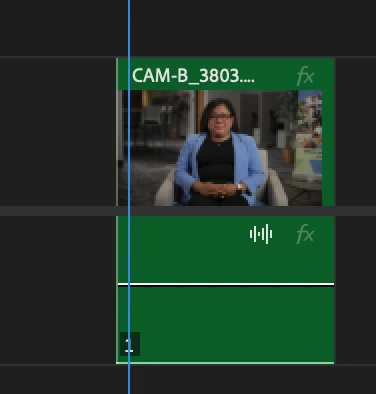
 

I have tried everything. I'm running Premiere Pro 2024 (24.5.0) on a 2020 iMac (Sonoma 14.5) with 72Gb of memory. 


I have tried rendering audio, clearing my cache, making sure wavforms are being generated in preferences, making sure wavforms are being shown on the timeline (via wrench tool) and completely reseting my preferences (by opening premiere and holding down option). When I did the complete reset, the wavforms showed up again! But then, when I zoomed in on my timeline, they disappeared and I cannot get them to show back up. Again, this is only on half of my clips and it is really frustrating to try and edit audio without being able to see the wavform. 


Any other suggestions? 

This topic has been closed for replies.

4 replies

Kevin J. Monahan Jr.
Legend
July 9, 2024

Hi @Mattie5C64,

Thanks, and sorry for the hassle. Please continue working with the developers to solve this issue. Provide system and media information and any workflow issues. For example, are you at minimal track height? Is this clip nested? See, How do I write a bug report?


I will update the status of your bug. I hope we can help you shortly.


Thanks,
Kevin

Kevin Monahan - Sr. Community and Engagement Strategist – Adobe Pro Video and Audio
Adobe Employee
July 9, 2024

Hi @Mattie5C64 - What format are the audio files?  Could you please add another screenshot that includes the time ruler?  As a workaround, Render>Audio does sometimes bring them back.  Thanks!

Kevin J. Monahan Jr.
Legend
August 23, 2024

Hi @Mattie5C64,

I hope you are well. Are you still experiencing this issue? If so, please provide the files and screenshots our developer requested. I'll move your post to the "Discussions" forum while we await your response. Sorry for the issue.


Thanks,
Kevin

Kevin Monahan - Sr. Community and Engagement Strategist – Adobe Pro Video and Audio
MyerPj
Community Expert
Community Expert
June 28, 2024

From the Sequence menu you can Render various items and even Audio. I've been able to get waveforms back this way, and they usually last for the session. But alas, they do not always just stay there.


Participant
June 28, 2024

Wanted to add that I also tried reseting to saved layout on my workspaces and it doesn't help.