

Akeblay
Known Participant
July 21, 2020
Question

Audio Waveforms Showing on SOME clips, not others
  • July 21, 2020
  • 6 replies
  • 1255 views


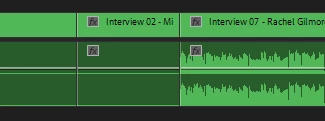
For some reason the majority of my nested sequences are NOT showing waveformed in my timeline. 
I have selected "Generate Waveform" under "Clip" for each one. 
I do have "Show Waveform" turned on.

There are no apparent differences in the nested sequences between the working sequences and those not showing the waveform. . 


The audio works for all of them, but the waveform only shows for about 10% of the clips in the sequence I'm building out.  

This topic has been closed for replies.

6 replies

Community Expert
July 21, 2020

I am also having the same issue, automatic audio waveform is checked but

it does not make any difference for me when this happens with nests.

tried Joellebh's solution to enable multicam then flatten, which worked for me

Ann Bens
Community Expert
Community Expert
July 21, 2020

In the preferences > audio > automatic audio waveform genenertion checked?

MyerPj
Community Expert
Community Expert
July 21, 2020

I have the same issue. However when I 'render audio', I get the waveforms back for a session, then they are gone again.

Joëlle Bh
Community Expert
Community Expert
July 21, 2020

Right click on your clip, choose unlink
Right click on the audio track only - multicamera - enable
Right click on the audio track again - multicamera - flatten

Peru Bob
Community Expert
Community Expert
July 21, 2020

Sequence > Render audio from the menu.

Akeblay
AkeblayAuthor
Known Participant
July 21, 2020

I tried this as well. The "Render Audio" function only renders the audio, it doesn't seem to have any effect on the waveform display 

Joëlle Bh
Community Expert
Community Expert
July 21, 2020
Akeblay
AkeblayAuthor
Known Participant
July 21, 2020

I just tried both of these and unfortunately that didn't fix it either 😕😕