Participant
November 3, 2022
Question

Audiotracks are not visible

  • November 3, 2022
  • 2 replies
  • 244 views

Dear community
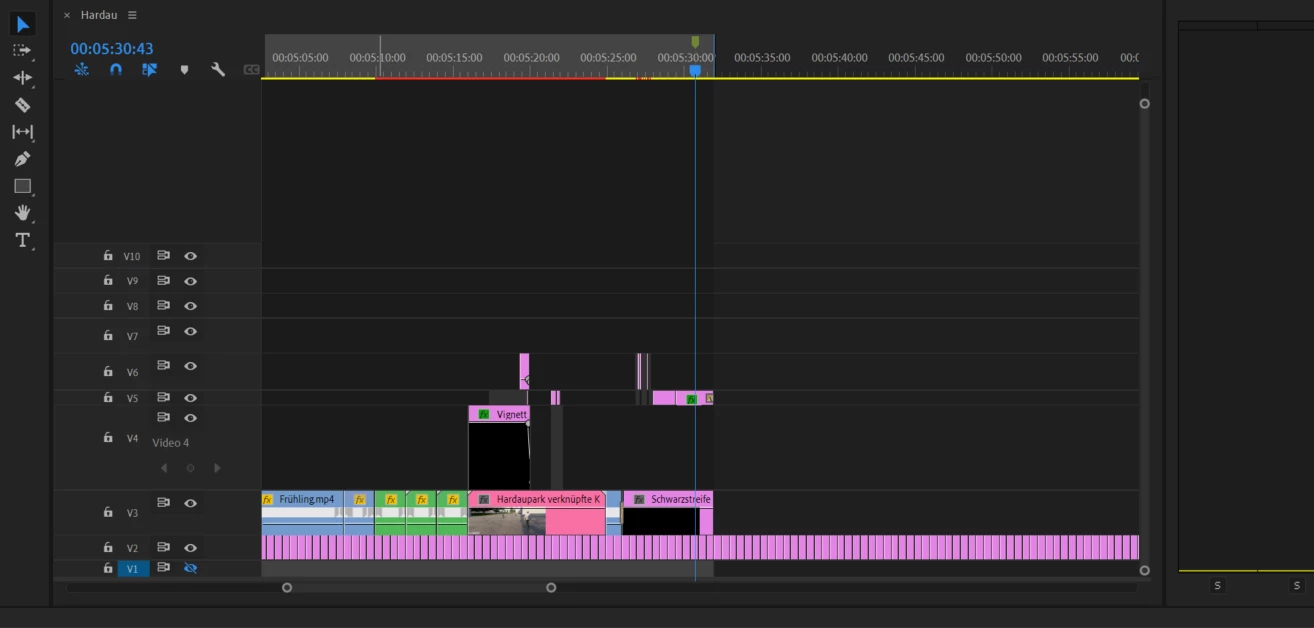
In my premier pro file i cant see the audiotracks. I can hear the sound but the tracks are not visible. It is possible to add a new track in the timeline but it is not vissible. Scrolling up or down dosn`t solve the problem because there`s nothing there. 
Thanks for your help:
 

This topic has been closed for replies.

2 replies

R Neil Haugen
Legend
November 3, 2022

You need to 'grab' the bottom of the V1 track area in the track control header bar on the left, and drag up.


Slowly move your mouse to the bottom of V1, just left into the control block from the clip area of the timeline. The area with the red highlight below.


When you get to the right place, the cursor changes to a double-ended arrow pointing up and down.


Click and drag up.


Neil


Everyone's mileage always varies ...
Participant
November 3, 2022

Thank you so much.

such a small thing drove me crazy for two hours. You saved my evening.

Harold Silva
Community Expert
Community Expert
November 3, 2022

Hola, lo que debes hacer es deslizar la barra de scroll al lado derecho.

Saludos

Harold Silva B.