
Participant
July 2, 2013
Answered

Audiounit/VST plugins not appearing in Premiere Pro CC

  • July 2, 2013
  • 2 replies
  • 45694 views

Hi

I recently the purchased the Slate Virtual Bus Compressor plugin bundle and was hoping to use it in Premiere Pro CC on OSX 10.8.4

Currently the plugins will not show at all in Premiere, but do show in Audition. I would have expected that they shared the same engine when it came to scanning and registering VST and Audiounit plugins.

All the other plugins by this company show and work with no problems in Premiere.

Is there any way to get Premiere to refresh the plugin list so that it 'sees' the new plugins?

I bought these plugins after I installed Premiere CC so maybe that has something to do with it?
    This topic has been closed for replies.
    Correct answer Charles VW

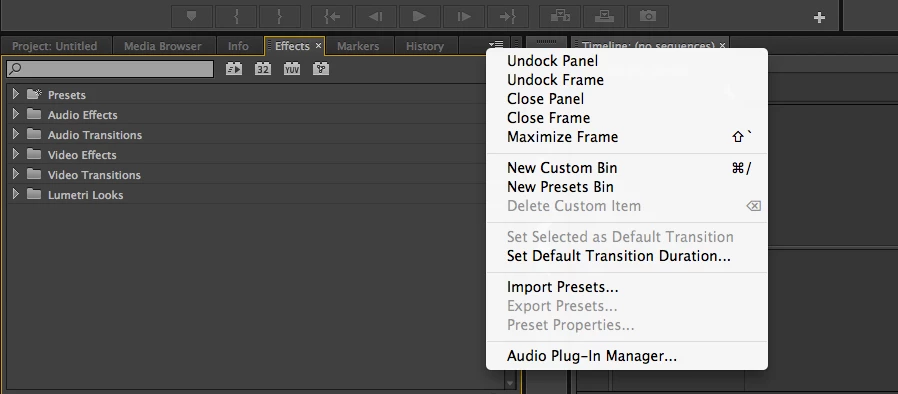
    It was unclear to me, but did you go to the new Audio Plug-In manager (flyout menu of the Effects panel)?

    In general, we no longer try to scan third-party audio plug-ins on every launch because there are too many bad plug-ins out there that could crash the application or have 30,000 nag screens for dongles and such.

    Also, which version of Audition are you comparing against?  If it is Audition CS6, then there will be 32-bit plug-ins that show up there, but won't show up in Audition CC or Premiere Pro CC as both of those are 64-bit apps and cannot natively load 32-bit plug-ins.

    2 replies

    Charles VW
    Charles VWCorrect answer
    Inspiring
    July 14, 2013

    It was unclear to me, but did you go to the new Audio Plug-In manager (flyout menu of the Effects panel)?

    In general, we no longer try to scan third-party audio plug-ins on every launch because there are too many bad plug-ins out there that could crash the application or have 30,000 nag screens for dongles and such.

    Also, which version of Audition are you comparing against?  If it is Audition CS6, then there will be 32-bit plug-ins that show up there, but won't show up in Audition CC or Premiere Pro CC as both of those are 64-bit apps and cannot natively load 32-bit plug-ins.

    Participant
    July 14, 2013

    Thankyou Charles VW, that was exactly the answer I was looking for and now Premiere Pro CC is seeing the new plugins.

    Also, I was checking against Audition CC

    Participant
    July 13, 2013

    Anyone got any ideas? Is there any way I can force Premiere to re-scan all the audio-unit and VST plugins?

    the_wine_snob
    Inspiring
    July 13, 2013

    PrPro has more limited use of VST's, than full audio-editing programs, like Audition.

    In very general terms, there are three "types" of VST's, relating to PrPro:

    1. Those VST's that can load and be used by PrPro
    2. Those VST's that can load, but cannot be used by PrPro (in older versions, the user got a one-time warning about such VST's. Not sure if the warnings still exist. Basically, the message stated "PrPro can load this VST, but cannot use it."
    3. Those VST's that cannot be loaded (so cannot be used either), and will often cause PrPro to hang on launch. PrPro writes a "blacklist," at each failure, so that it does not try to load that VST again.

    It will probably take a response from an Adobe Developer, to tell us exactly what some VST's load and work fine in PrPro, but others cause issues, or just do not show up.

    Good luck,

    Hunt

    Participant
    July 14, 2013

    The thing that is odd is that the plugins load fine in Premiere CS6.

    So there is no way to get Premier to manually refresh the plugin list? Or is this completely unecessary?