
Known Participant
August 21, 2023
Question

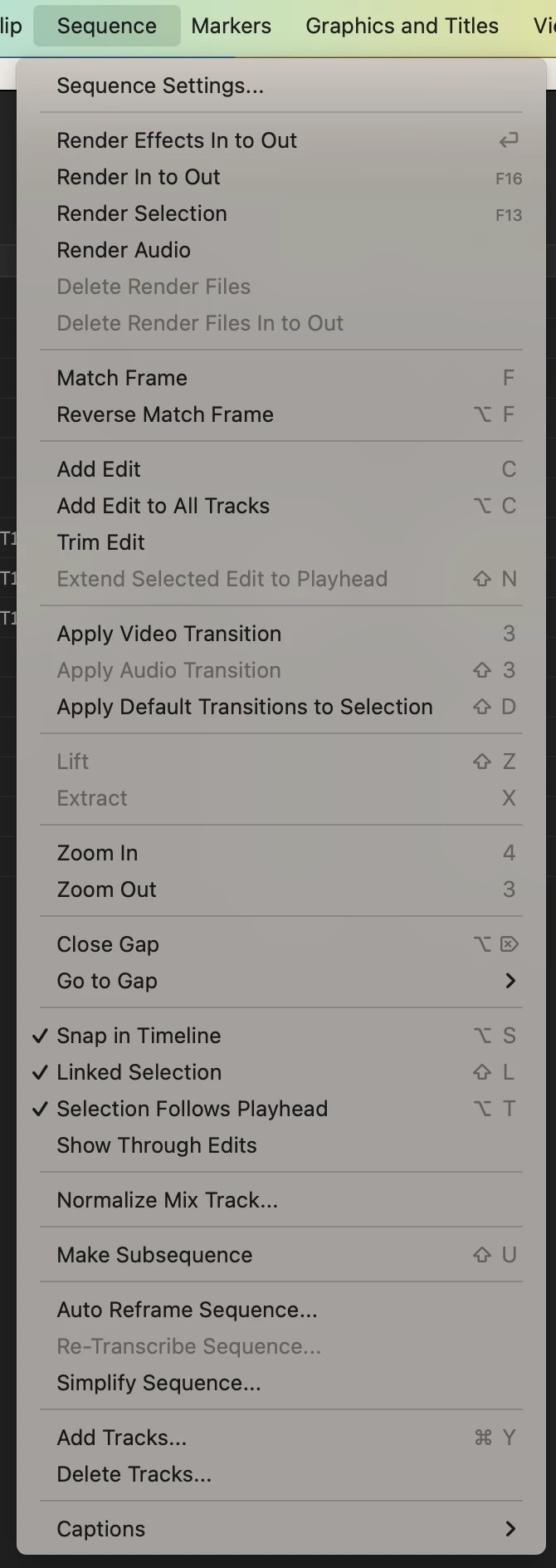
auto-transcribe not available in sequence menu in premiere pro 23.5
  • August 21, 2023
  • 1 reply
  • 4393 views

Hi,

I'm running Premiere 23.5 on an M1 MBP with Ventura. The auto-transcribe sequence function is not available in the sequence dropdown menu, where it used to be located and where it's still supposed to be according to what I read.

I tried using the transcript window within the text window instead. However, this doesn't seem to give me an option to select the language. It defaults to English, but since my VO is in German, the resulting text is nonsense. I am aware that language packs need to be installed for anything other than English. The system doesn't know though that the text is in German and I can't find a way to tell it.


Am I missing something or is this a bug? Please advise.


Thanks in advance,


Best, Julian


This topic has been closed for replies.

1 reply

Ann Bens
Community Expert
Community Expert
August 21, 2023

The option is located in the Import tab.

Known Participant
August 21, 2023

Thank you for the prompt response, Ann! I found the option where you described.


So, transcribing is only longer possible at the clip level on import, but not at the sequence level or for clips which have already been imported to the project, am I getting that right?


Stan Jones
Community Expert
Community Expert
August 21, 2023

@nextneville,


It does say "all imported clips," but if you import and then change the setting, it will auto-transcribe any SOURCE media that has not been transcribed. Or you can use the setting for only clips in sequences.


You change the setting via Edit -> Preferences -> Transcription. If you set it there, be sure to set the default language.


I think that it is only the auto-transcription that does not open the Create transcription dialogue - which is where you can change the language for each transcription. If you get a dialogue and do not see an option for language, be sure to click the drop down there for transcription settings.


Correct, it only does this on source media. It will not auto-transcribe STATIC transcripts for sequences. But you can nest a sequence and use its static transcript just like you would a source media transcript.


Stan