Known Participant
December 11, 2025
Answered

Automation blocks - changing randomly an item of a sequence

  • December 11, 2025
  • 3 replies
  • 239 views

Dear community, I am new to automation blocks and I would like to see if this amazing plugin can help me in this: I have a sequence with a clip (an video image) and some text. I have a bin with serveral clips (video images). I would like the plugin to change my clip in the timeline by clicking on "run" so that it picks a random clip and I can rapidly select the correct clip for my timeline. Ideally the lenght of the clip should be at least as long as the time line lenght...


Does it make sense?


Thanks

Luca

Correct answer Mathias Moehl

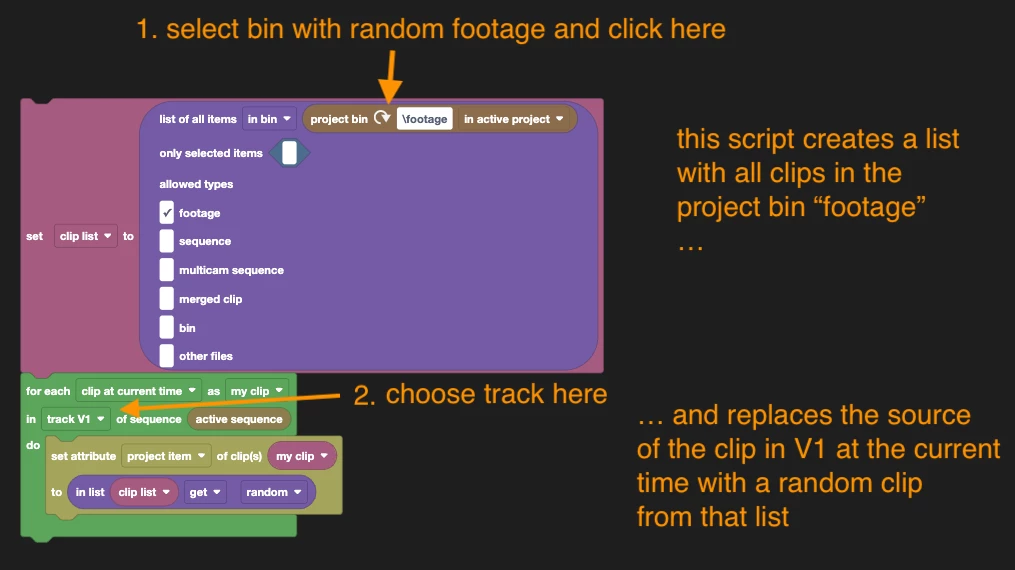
Or maybe this is what you want?
869136i1C8074806D07734C.png
In the bloxk code you can configure the bin containing your random footage items (default: bin "footage") and the video track (default V1). Then you can run the script and it will replace the source of the clip in the active sequence at the current time in that track by one of the random clips. If the track is empty at current time, it won't do anything.

I just added this to the Community Library.

You can download it here:
Clips/Clip Source/Replace Clip in V1 and Current Time with Random Clip.xml


To try it, just download the XML file, load it into Automation Blocks, customize (as described in screenshot above) and run it.

3 replies

Mathias Moehl
Community Expert
Mathias MoehlCommunity ExpertCorrect answer
Community Expert
December 11, 2025

Or maybe this is what you want?
869136i1C8074806D07734C.png
In the bloxk code you can configure the bin containing your random footage items (default: bin "footage") and the video track (default V1). Then you can run the script and it will replace the source of the clip in the active sequence at the current time in that track by one of the random clips. If the track is empty at current time, it won't do anything.

I just added this to the Community Library.

You can download it here:
Clips/Clip Source/Replace Clip in V1 and Current Time with Random Clip.xml


To try it, just download the XML file, load it into Automation Blocks, customize (as described in screenshot above) and run it.

Mathias Möhl - Developer of tools like BeatEdit and Automation Blocks for Premiere Pro and After Effects
Known Participant
December 18, 2025

Amazing plugin!

Mathias Moehl
Community Expert
Community Expert
December 11, 2025
Mathias Möhl - Developer of tools like BeatEdit and Automation Blocks for Premiere Pro and After Effects
Kevin J. Monahan Jr.
Legend
December 11, 2025

Hello Luca,

Thanks for your post and for tagging it appropriately as "SDK." I hope that someone from Automation Blocks will drop by with some assistance for you. @Mathias Moehl should be able to help. Sorry for the delay.


Thanks,
Kevin


Kevin Monahan - Sr. Community and Engagement Strategist – Adobe Pro Video and Audio