


Participant
January 22, 2025
Answered

Automation Blocks - Clone a sequence, change its sequence settings

  • January 22, 2025
  • 2 replies
  • 644 views

Hailing the Great @Mathias Moehl,


Forgive me for this easy one, but I want to:

1. Clone a (16x9) active sequence into a new sequence with different sequence settings (ie 1080x1920)
2. Fill to frame all clips within this new 1080x1920 sequence
3. Add new project items within that newly cloned sequence to specifific video tracks (like bug .png & end card etc).


This could be a great script for quick social clips. Many thanks for all your hard work and amazing tool.

Correct answer Mathias Moehl

Step 1: cannot be automated easily, unfortunately: You can clone a sequence, but cannot change its resolution. As far as I know that cannot be done via scripting in Pr.
What you can do is create a new sequence and then loop over the clips of the old sequence and insert the same project items at the same times in the new sequence. But the all effects, keyframmes etc won't be copied - just the raw clips with their timing.

Step 2: For this we have Scale Clips to Fit or Fill Frame Size


Step 3: 

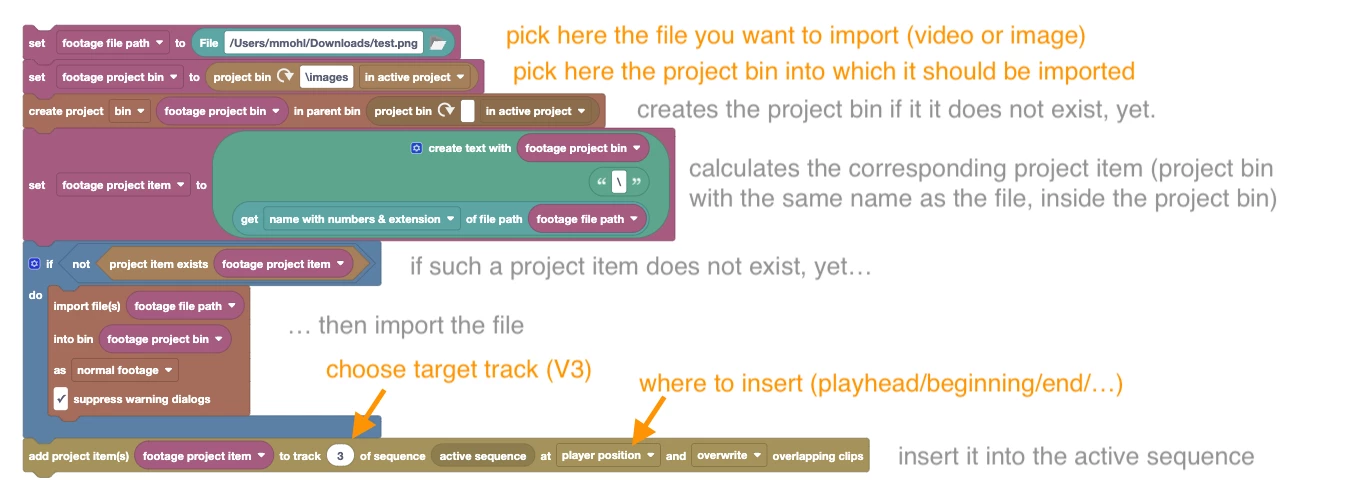
Here I just created a sample script for you, which you can use if you need to insert the same footage file frequently in your projects (say a watermark or logo). It

- imports the clip if it has not been imported before and then

- places it in the active sequence


The script is now in the Community Library at

Sequence/Populate/Import Footage File and Insert it in Active Sequence V3 at Current Time.xml

2 replies

Mathias Moehl
Community Expert
Mathias MoehlCommunity ExpertCorrect answer
Community Expert
January 22, 2025

Step 1: cannot be automated easily, unfortunately: You can clone a sequence, but cannot change its resolution. As far as I know that cannot be done via scripting in Pr.
What you can do is create a new sequence and then loop over the clips of the old sequence and insert the same project items at the same times in the new sequence. But the all effects, keyframmes etc won't be copied - just the raw clips with their timing.

Step 2: For this we have Scale Clips to Fit or Fill Frame Size


Step 3: 

Here I just created a sample script for you, which you can use if you need to insert the same footage file frequently in your projects (say a watermark or logo). It

- imports the clip if it has not been imported before and then

- places it in the active sequence


The script is now in the Community Library at

Sequence/Populate/Import Footage File and Insert it in Active Sequence V3 at Current Time.xml

Mathias Möhl - Developer of tools like BeatEdit and Automation Blocks for Premiere Pro and After Effects
jtphawkAuthor
Participant
January 22, 2025

Thank you so much @Mathias Moehl , really appreciate the time you take with your responses. WIll definitely be buying after trial. One last request, how can you make a two-up vertical split screen from selected clips already in a 9x16 timeline? (I'm having trouble reverse engineering current 3-up stack script since it uses "add project item" code)

Mathias Moehl
Community Expert
Community Expert
January 24, 2025

You are referring to the script

"Create 1080x1920 Sequence from 3 Selected Clips Stacked on Top of Each Other"

from the Community library, right?


If the clips are already already in the sequence, you just need to adjust their scale and position, right?

I assume your issue is that you don't know how to do that for the selected clips. In the example mentioned above, I insert the clips into a new (and hence empty) sequence. Therefore I know that the clips I want to scale are the first clips in tracks V1, V2, V3 of the active sequence. I can access those with the path texts:
::V2\1 

for example, which means "from the active sequence take from track V2 the first clip"
If you want to scale all selected clips in V2, instead of the first one, you can use a For Each Clip block

Mathias Möhl - Developer of tools like BeatEdit and Automation Blocks for Premiere Pro and After Effects
Kevin J. Monahan Jr.
Community Manager
Community Manager
January 22, 2025

Hi @jtphawk,

Thanks for the post. Please also tag any Automation Blocks post with "SDK" so that he can be directed to these messages better in the future. I hope he can help you answer your questions. Take care.


Thanks,
Kevin


Kevin Monahan - Sr. Community and Engagement Strategist – Adobe Pro Video and Audio