
Community Expert
January 13, 2025
Answered

Automation Blocks: convert Timline clips to Subclips

  • January 13, 2025
  • 2 replies
  • 1174 views

I am new to Automation Blocks, and trying to figure out how to take a long sequence full of clips and convert each of them into a subclip where the trims are restricted to the subclip boundaries.

Any help would be greatly appreciated! 
Correct answer Mathias Moehl

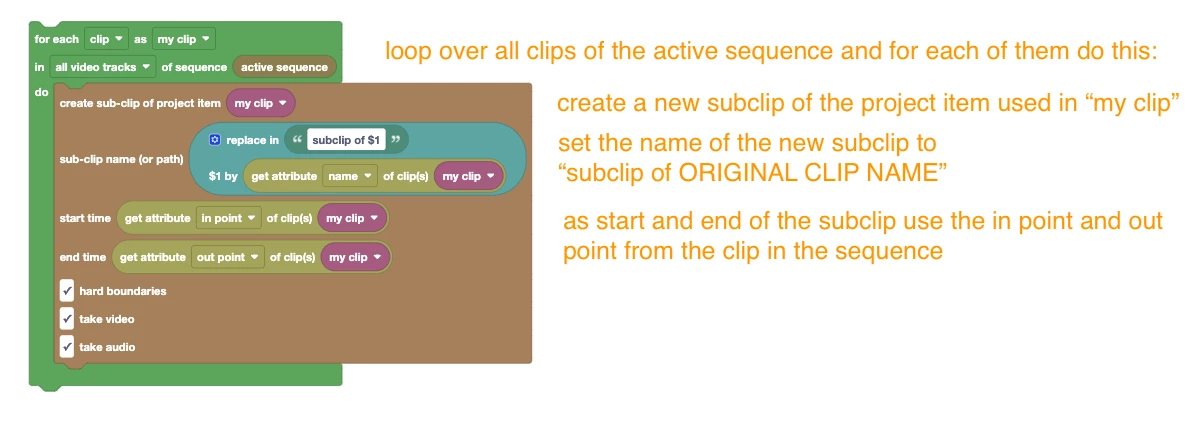
I guess this is what you are looking for:


The code is attached and I also just added it to the Community Library in the category
Clips/Sub Clips


2 replies

Mathias Moehl
Community Expert
Mathias MoehlCommunity ExpertCorrect answer
Community Expert
January 14, 2025

I guess this is what you are looking for:


The code is attached and I also just added it to the Community Library in the category
Clips/Sub Clips


Mathias Möhl - Developer of tools like BeatEdit and Automation Blocks for Premiere Pro and After Effects
Community Expert
January 15, 2025

This worked brilliantly, thanks @Mathias Moehl!

Mathias Moehl
Community Expert
Community Expert
January 15, 2025

Great!
Bonus tip:
If you replace the text "subclip of $1" by "footage\subclip of $1" it will place the subclips in the bin "footage" of your project.
Just make sure that bin exists or add a block at the beginning to create the bin if necessary.

Mathias Möhl - Developer of tools like BeatEdit and Automation Blocks for Premiere Pro and After Effects
Kevin J. Monahan Jr.
Legend
January 14, 2025

Hey Paul,

I hope that @Mathias Moehl will respond.


Cheers,
Kevin


Kevin Monahan - Sr. Community and Engagement Strategist – Adobe Pro Video and Audio