lowdencraftww
Participating Frequently
March 13, 2026
Answered

Automation Blocks - create individual timelines from selected clips

  • March 13, 2026
  • 3 replies
  • 70 views

Hello

Using Automated Block, I am trying to create individual sequences to the spec of selected clips in  the PP project panel. The created sequences’ timecode should be the same as the clip that it was created from.

Looking through the nodes available , I cannot see anything that might do this.

Any thoughts are most welcome.

Thank you

    Correct answer Mathias Moehl

    Download (from Community Library):
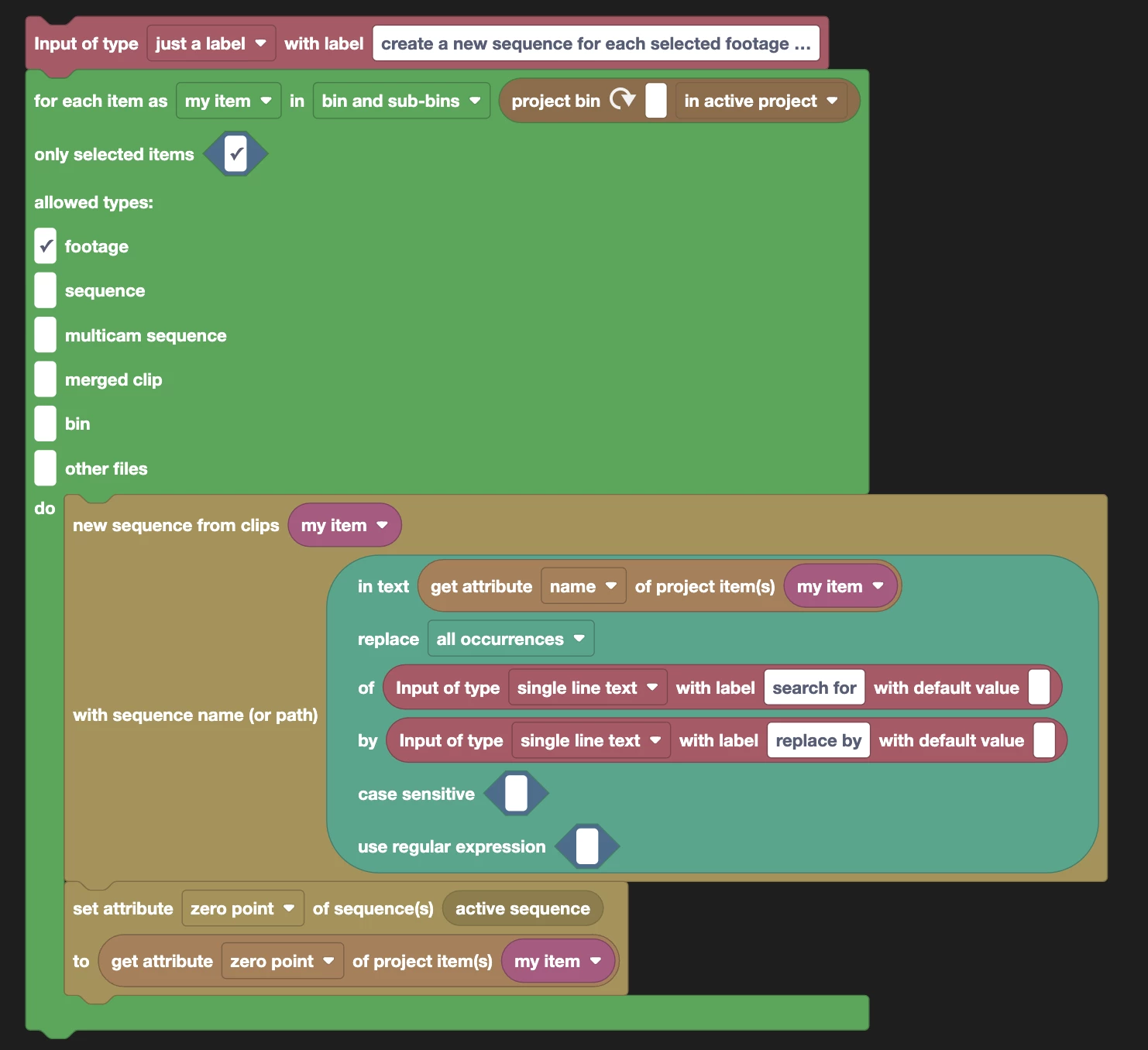
    Sequence/Create/Create New Sequence For Each Selected Footage Item - preserve timecode start.xml

    This script creates a new sequence for each selected project item and makes sure the zero point (i..e. timecode of the first frame) of the sequence is identical to the zero point of the project item.

    It also has a search/replace feature. So if you have project items like “Clip 001.mp4” and enter in the inputs panel:
    - search for “.mp4”
    - replace by “ sequence”
    the sequence will be named “Clip 001 sequence”


    How did I create this? We already had a script “Create New Sequence for Each Selected Footage Item” in the Community Library. I just added one extra block to set the zero point as requested.


    3 replies

    Mathias Moehl
    Community Expert
    Mathias MoehlCommunity ExpertCorrect answer
    Community Expert
    March 15, 2026

    Download (from Community Library):
    Sequence/Create/Create New Sequence For Each Selected Footage Item - preserve timecode start.xml

    This script creates a new sequence for each selected project item and makes sure the zero point (i..e. timecode of the first frame) of the sequence is identical to the zero point of the project item.

    It also has a search/replace feature. So if you have project items like “Clip 001.mp4” and enter in the inputs panel:
    - search for “.mp4”
    - replace by “ sequence”
    the sequence will be named “Clip 001 sequence”


    How did I create this? We already had a script “Create New Sequence for Each Selected Footage Item” in the Community Library. I just added one extra block to set the zero point as requested.


    Mathias Möhl - Developer of tools like BeatEdit and Automation Blocks for Premiere Pro and After Effects
    lowdencraftww
    Participating Frequently
    March 16, 2026

    Hello Mathias

    Thank you for the solution. I don’t know how I missed the script in the library.  

    lowdencraftww
    Participating Frequently
    March 14, 2026

    Gemini AI proposal … it reads coherently but I cannot work out how to make it in Automation Blocks


    The Block Setup

    You want to build a stack that looks like this:

    1. Selection Block: Use the for each item in Project Panel selection block.

    2. Filter: (Optional but recommended) Use an if block to check if the item is a footage item to avoid trying to make a timeline out of a folder.

    3. Variable: Create a variable called startTime and set it to:

      • get property "startTime" of item [item]

    4. Create Sequence: Use the create sequence from clip block.

      • Clip: [item]

      • Name: [item].name (or whatever naming convention you prefer).

    5. Set Timecode: This is the "secret sauce." Use the set property "zeroPoint" of [sequence] block.

      • Set the value to the startTime variable you captured in step 3.

    Key Technical Details

    • The "Zero Point" Property: In Premiere Pro’s API (which Automation Blocks uses), the starting timecode of a sequence is technically called the zeroPoint.

    • Time Units: Automation Blocks usually handles the conversion between "Timecode Strings" (01:00:00:00) and "Seconds" automatically, but ensure your startTime variable is pulling the raw time value so the zeroPoint matches perfectly.

    • Selection: Make sure you have the clips selected in the Project Panel (not the Timeline) before hitting "Run."

    Pro-Tip for Naming

    If you want to keep your project organized, I'd suggest adding a "Suffix" to the sequence name within the block, like: Create sequence with name: [item].name + "_VFX_Pull"

    Peru Bob
    Community Expert
    Community Expert
    March 13, 2026

    @Mathias Moehl