


Participant
September 1, 2026
Answered

Automation Blocks - Creating Master Sequence from CSV Sequence List of IN/OUT

  • September 1, 2026
  • 7 replies
  • 69 views

Hi, I’m having trouble using Automation Blocks, it’s my first time trying it and I have several hours of multi cam footage synced up into separate sequences that I want to pull into 1 master assembly sequence using the automation.

I’m trying to first test the script on a basic 9 row CSV with 3 columns (no headings)

Column A - Sequence names (matching project)
Column B - timecode in (hh:mm:ss:ff)
Column C - timecode out

I have linked the CSV in the console, but it seems to be having trouble with the end blocks timecode converting as I get this error

execute script destructor final end point 'main script' reached execution result:"cannot convert to time value: undefined (line 6)"
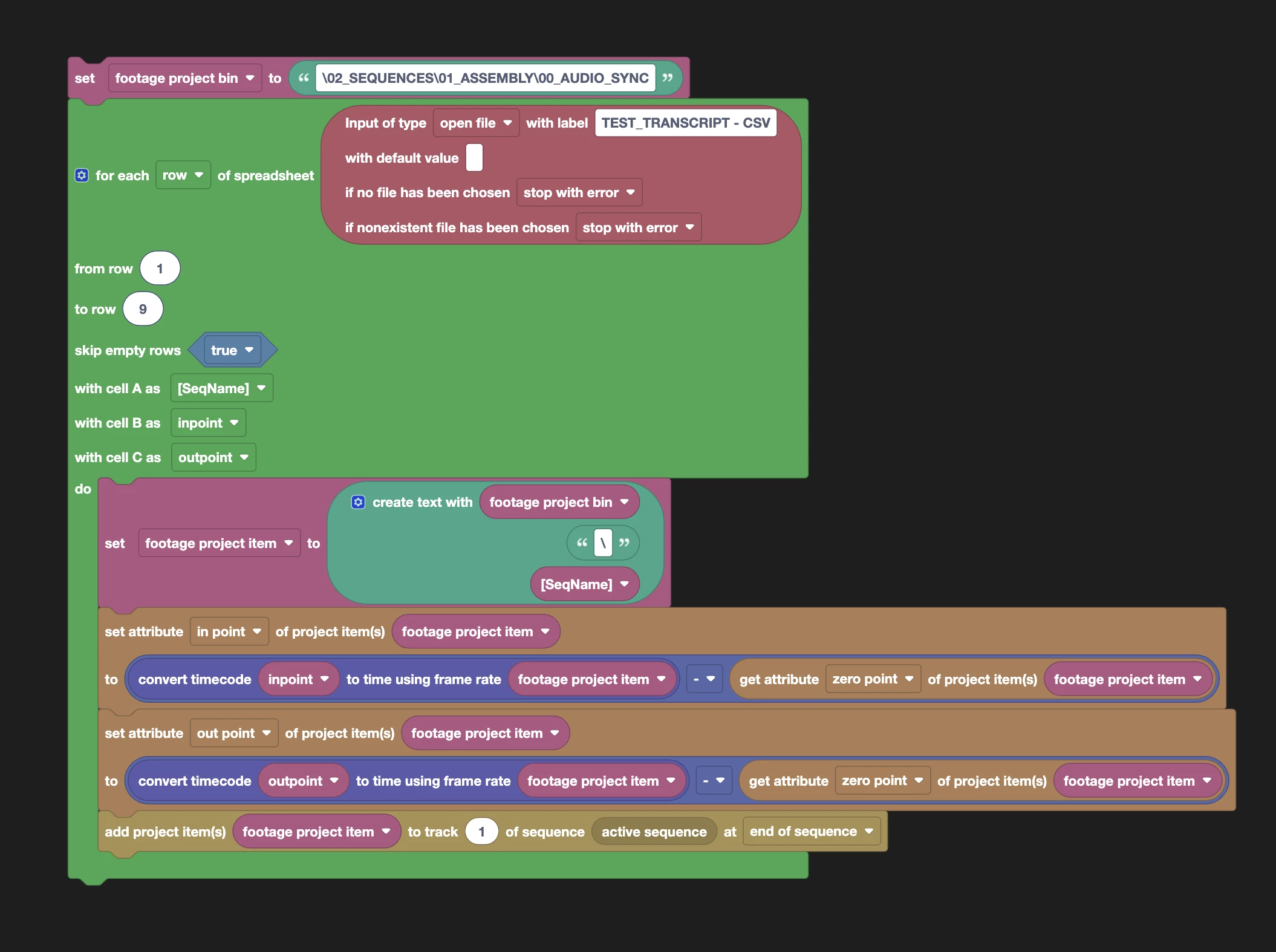


Any help on what I’m doing wrong would really be appreciated, I couldn’t find an existing template in the Community GDrive but if there is please let me know. 

Thanks!

Correct answer PaulMurphy

This script should do what you’re looking for.

In Automation Blocks, click Load and select the XML file.

Under Inputs, select your CSV location and enter your bin path, then click Run.

7 replies

Mathias Moehl
Community Expert
Community Expert
September 3, 2026

Great to see that ​@PaulMurphy already solved it - thanks!

Mathias Möhl - Developer of tools like BeatEdit and Automation Blocks for Premiere Pro and After Effects
Community Expert
September 2, 2026

Every item in your Project panel - footage, sequences, everything - is represented the same way when a script looks it up: as a generic "project item." For footage, that generic wrapper does carry useful info like frame rate and start timecode, so a block like "get property → zero point" works fine.

But sequences are different. When a sequence is being used as a source clip (like in your multicam/sync setup), its frame rate and Starting Timecode simply aren't available through that generic project item wrapper - Premiere only exposes them on the sequence itself, not on its Project panel icon. So when the script asks the project item for "zero point," it gets back nothing (undefined) instead of a number, and the next step - converting a timecode into a usable time value - fails, because it's trying to do math with a value that isn't there. That's the cannot convert to time value: undefined error.

Participant
September 2, 2026

Thanks ​@PaulMurphy it’s good to understand what’s throwing it, that makes sense. Do you have any workarounds or suggestions on what the best / easiest way around this would be? I have around 17 multi cams seqs of interviews, all comprised of multiple takes and roughly 1 hour each that I need to chop up and place into the assembly sequence. Only solutions I can think of right now are all manual and really time consuming!

PaulMurphyCommunity ExpertCorrect answer
Community Expert
September 2, 2026

This script should do what you’re looking for.

In Automation Blocks, click Load and select the XML file.

Under Inputs, select your CSV location and enter your bin path, then click Run.

Community Manager
September 1, 2026

Hello ​@sharp_Everglow2112,

Thanks for the question. Looks like we’ll need ​@Mathias Moehl to field this question. I appreciate your patience in receiving a response. Sorry for the dealy.

Thanks,
Kevin

Participant
September 2, 2026

Thanks ​@Kevin-Monahan ! 🙏