


Participant
January 29, 2025
Answered

Automation Blocks - Duplicate Project Items

  • January 29, 2025
  • 1 reply
  • 630 views

Hello @Mathias Moehl !


¿Is there a way to duplicate project items with code or maybe some clever use of blocks?


In my case, I have footage as .mxf with differente languages distribuited along the channels and I want to add them separetly along some audioTracks. I'm using custom metadata to write which languages each file contains and using a forloop with the list lenght and content to add each language to the correct track, the problem comes when I tried to modify the channelmapping based on the language, as when you change the chanelmapping of an item, all uses of that file changes to the new Mapping, for explample, in a file with: ENG,POL,HUN,ROM,RUS,DUT, its adding correctly each language to their respective tracks, but change in the ChannelMapping, at the end of the day all have the DUT audio as it was the last to be iteraded. 

This is the function I'm using the separate each language, the If statement checks if the list contains the language and set the variable IDIOMA to = 1, 2, 3.... depending on the language.
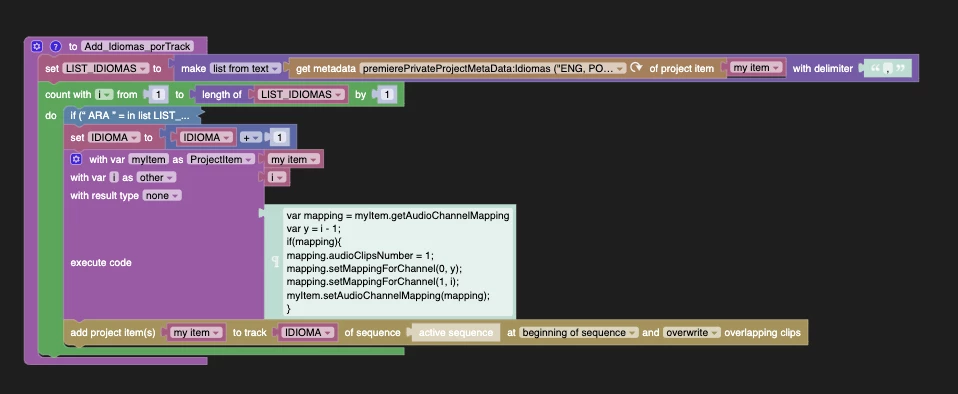
 

That's why I thougt maybe duplicating the .mxf and changin the channelmapping for each file would work better.


I'm attachin the full code aswell.


Let me know if you have any idea!

Thanks

 

Correct answer Mathias Moehl

Great to see that you try to automate workflows in Premiere Pr using Automation Blocks! Unfortnately, I am not aware of any method to duplicate a project item with Premiere Pro's scripting engine (and hence also not with Automation Blocks).


Possible workarounds:

1. Get the media path of the project item and then import that file again.

2. create a subclip and then use this subclip instead of the original item.

1 reply

Mathias Moehl
Community Expert
Mathias MoehlCommunity ExpertCorrect answer
Community Expert
January 29, 2025

Great to see that you try to automate workflows in Premiere Pr using Automation Blocks! Unfortnately, I am not aware of any method to duplicate a project item with Premiere Pro's scripting engine (and hence also not with Automation Blocks).


Possible workarounds:

1. Get the media path of the project item and then import that file again.

2. create a subclip and then use this subclip instead of the original item.

Mathias Möhl - Developer of tools like BeatEdit and Automation Blocks for Premiere Pro and After Effects
Participant
January 30, 2025

Oh never thought about getting the media file path and re-importing it, thats a clever use of blocks in my book!


Will try both! Thank you!


PS: Could we have the option to save workspaces within the automationblock pannel?, pretty please :')

Mathias Moehl
Community Expert
Community Expert
January 30, 2025

Feature request noted 🙂 That's on my feature request list already, but I cannot promise if/when it will happen.

Mathias Möhl - Developer of tools like BeatEdit and Automation Blocks for Premiere Pro and After Effects