



Automation Blocks increment version and save
Today I got a question from @MyerPj how to implement a versioning system for Premiere Pro with my (paid) extension Automation Blocks for Pr.
If anybody is looking for the same, here is a starting point. This script saves the currently active project with a new version number. I.e. if the current project is "test_V1.prproj" then it is saved as "test_V2.prproj".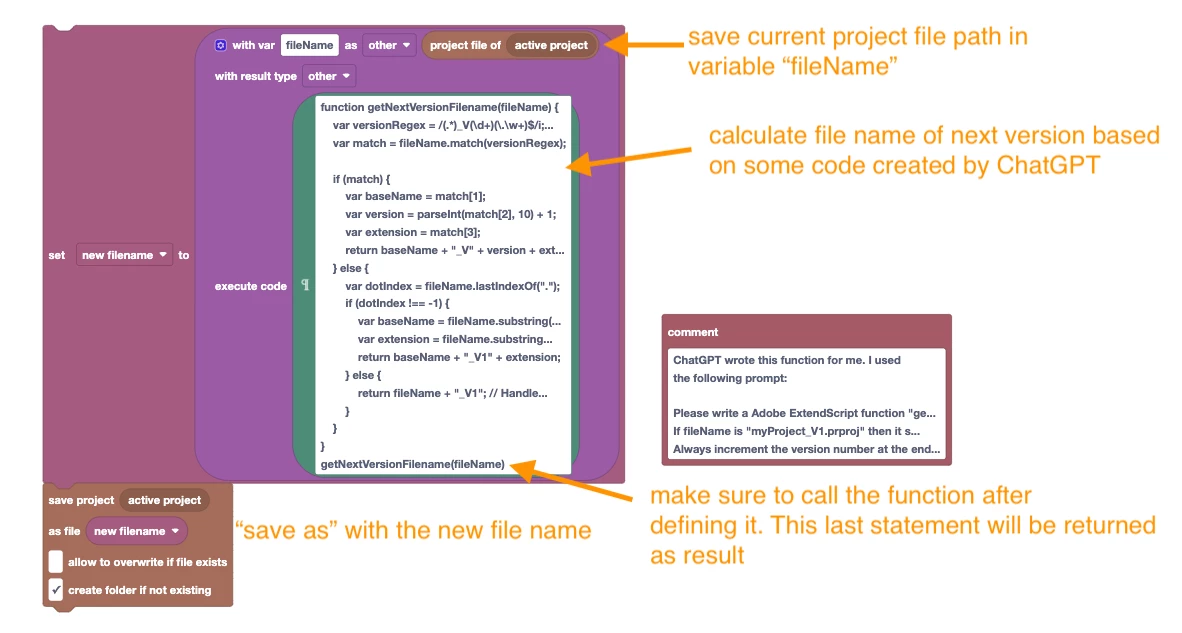
The logic to modify the file name has been implemented in an Execute Code block with code generated by ChatGPT.
Here is the exact prompt I used in ChatGPT to create the code:
Please write a Adobe ExtendScript function "getNextVersionFilename" which takes as arguments "fileName" and returns a new file name for the next version. If fileName is "myProject_V1.prproj" then it should return "myProject_V2.prproj", for example. Always increment the version number at the end by one. Or add a new version number 1 if there is no version number, yet.
Block script is attached.


 AdChoices