Participant
July 30, 2025
Answered

Automation Blocks : Is it Possible to delete empty V and A Tracks in all selected sequences?

  • July 30, 2025
  • 2 replies
  • 361 views

Finding documentation on clips and MOGRT, but is it possible to adress the tracks and delete unused as in the timeline Panel via second click?  Thanks

Correct answer ThioJoe

Turns out the extendscript "QE" API has built in methods for removing empty audio and video tracks. Be aware that technically the QE API is not supported and not documented (it's appraently meant for internal testing and stuff), so don't necessarily expect it to work forever, or to be able to get help if there's a bug.


With that disclaimer, this for example would do what you want, but only for the current active sequence:

app.enableQE();
qe.project.getActiveSequence().removeEmptyAudioTracks();
qe.project.getActiveSequence().removeEmptyVideoTracks();


Which you could do by just putting it into the "Pr Other" block in the execute code field:
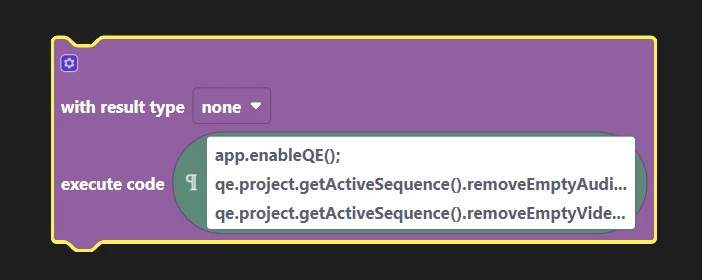
 

Again that would only be for the active sequence.


Keep in mind behind the scenes, the QE API uses different object types than the regular API. Meaning you can't feed in a regular "Sequence" object into the QE API, since it uses its own "QESequence" objects.


I tried looking for a way to get a list of currently selected QESequence objects from the project panel, and while it's probably possible, it's not straightforward because there doesn't seem to be an equivalent to the "getCurrentProjectViewSelection" method for the QE objects. 

2 replies

ThioJoe
Community Expert
ThioJoeCommunity ExpertCorrect answer
Community Expert
July 31, 2025

Turns out the extendscript "QE" API has built in methods for removing empty audio and video tracks. Be aware that technically the QE API is not supported and not documented (it's appraently meant for internal testing and stuff), so don't necessarily expect it to work forever, or to be able to get help if there's a bug.


With that disclaimer, this for example would do what you want, but only for the current active sequence:

app.enableQE();
qe.project.getActiveSequence().removeEmptyAudioTracks();
qe.project.getActiveSequence().removeEmptyVideoTracks();


Which you could do by just putting it into the "Pr Other" block in the execute code field:


Again that would only be for the active sequence.


Keep in mind behind the scenes, the QE API uses different object types than the regular API. Meaning you can't feed in a regular "Sequence" object into the QE API, since it uses its own "QESequence" objects.


I tried looking for a way to get a list of currently selected QESequence objects from the project panel, and while it's probably possible, it's not straightforward because there doesn't seem to be an equivalent to the "getCurrentProjectViewSelection" method for the QE objects. 

Participant
August 4, 2025

Thank you so much! Ill try and report back.

Participant
August 4, 2025

Great - Even though its only the active Squence - It´ll save me so much time. ❤️

Peru Bob
Community Expert
Community Expert
July 30, 2025
Mathias Moehl
Community Expert
Community Expert
July 30, 2025

As far as I know, with the Pr scripting API (and hence also with Automation Blocks) it is not possible to delete tracks.

Mathias Möhl - Developer of tools like BeatEdit and Automation Blocks for Premiere Pro and After Effects