


Inspiring
April 10, 2025
Answered

Automation Blocks - Moving Sequences to Another Project Within Production

  • April 10, 2025
  • 2 replies
  • 627 views

Hello @Mathias Moehl 


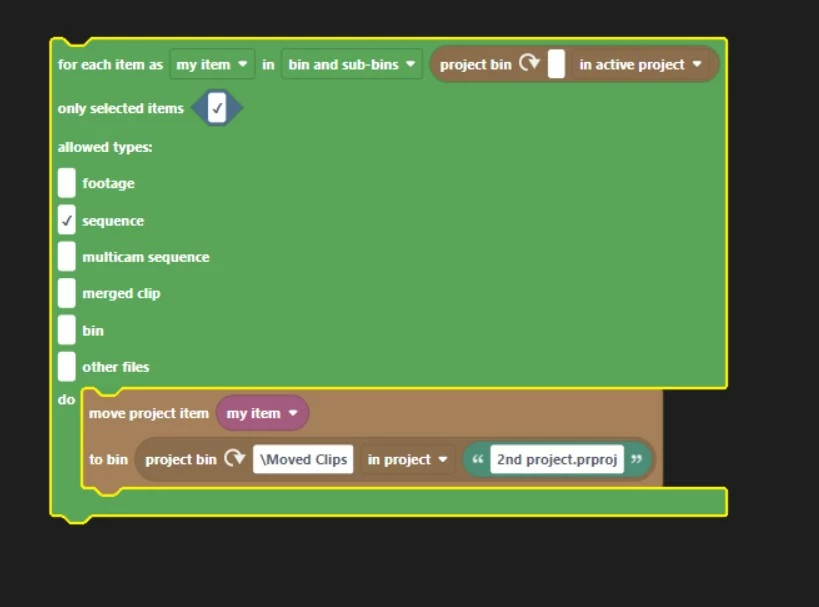
The below script takes a selected sequence and moves it to a second project within the same Production.

Works fine, but when I save the second project and re-open it, all the assets in the timeline of the moved sequence have been copied over to the 2nd project in a new bin called 'Recovered Clips'

I'm trying to avoid redundant copies of my graphics/video files, etc. Is there any way to do this and still leverage the capacity of Productions to keep the assets in the original project, and just have the sequence in the second project?

Correct answer bbb_999

Correct, there's no way to create a cross-project reference via ExtendScript API.

2 replies

Mathias Moehl
Community Expert
Community Expert
April 11, 2025

Hi Sam,

this seems to be a limitation of the Pr scripting engine.

@Bruce Bullis : Is this the expected behavior when moving project items from one project to another one in a production using ProjectItem.moveBin()? Are there any workarounds?

Mathias Möhl - Developer of tools like BeatEdit and Automation Blocks for Premiere Pro and After Effects
bbb_999
Community Manager
bbb_999Community ManagerCorrect answer
Community Manager
April 11, 2025

Correct, there's no way to create a cross-project reference via ExtendScript API.

Inspiring
April 11, 2025

Here's something interesting I just noticed - There are three projects...
Project 1 - video files (some graphics) / sequences 

Project 2 - graphics
Project 3 - where I move the sequences to.

ONLY the assets that live in Project 1 (the one with the sequences) get carried over to project 3 when moving the sequences.

The graphics in project 2 stay where they are and still link to the moved sequences.

The fix COULD be for everything to live in Project 2, so when I move things from project 1 to project 3, everything still lives in project 2.

BUT - we all previously identified a bug in the API where if a clip in a sequence lives in a different project than the sequence, we can't pull the project/folder location of that clip.

Unfortunately for this particular workflow, some of my assets need to live in the same project as the sequences initially to pull the information I need.

Kevin J. Monahan Jr.
Legend
April 11, 2025

Hi,

I hope our Adobe Expert will help you shortly.


Thanks,
Kevin


Kevin Monahan - Sr. Community and Engagement Strategist – Adobe Pro Video and Audio