Participant
February 28, 2024
Question

Automation Blocks plugin: Trouble when setting up rendering from bin

  • February 28, 2024
  • 1 reply
  • 1853 views

Hey guys, it seems i can't wrap my head around the ''for each project item" block.

From my understanding each item present in my premiere bin is saved temporarely in the ''my item'' variable.

When i add an ''add to media encoder'' block inside the ''for each project item", it works only with ''active sequence'' but not when i add the ''my item'' variable.

Am i missing something?

My objective is to export multiple sequences from one premiere bin in a predetermined folder.

It seems like it only works if i use elements from the ''Pr project item'' tab in Automation block.

I attached an image so you can see what am i talking about. I circled in pink the variable i think is the problem.
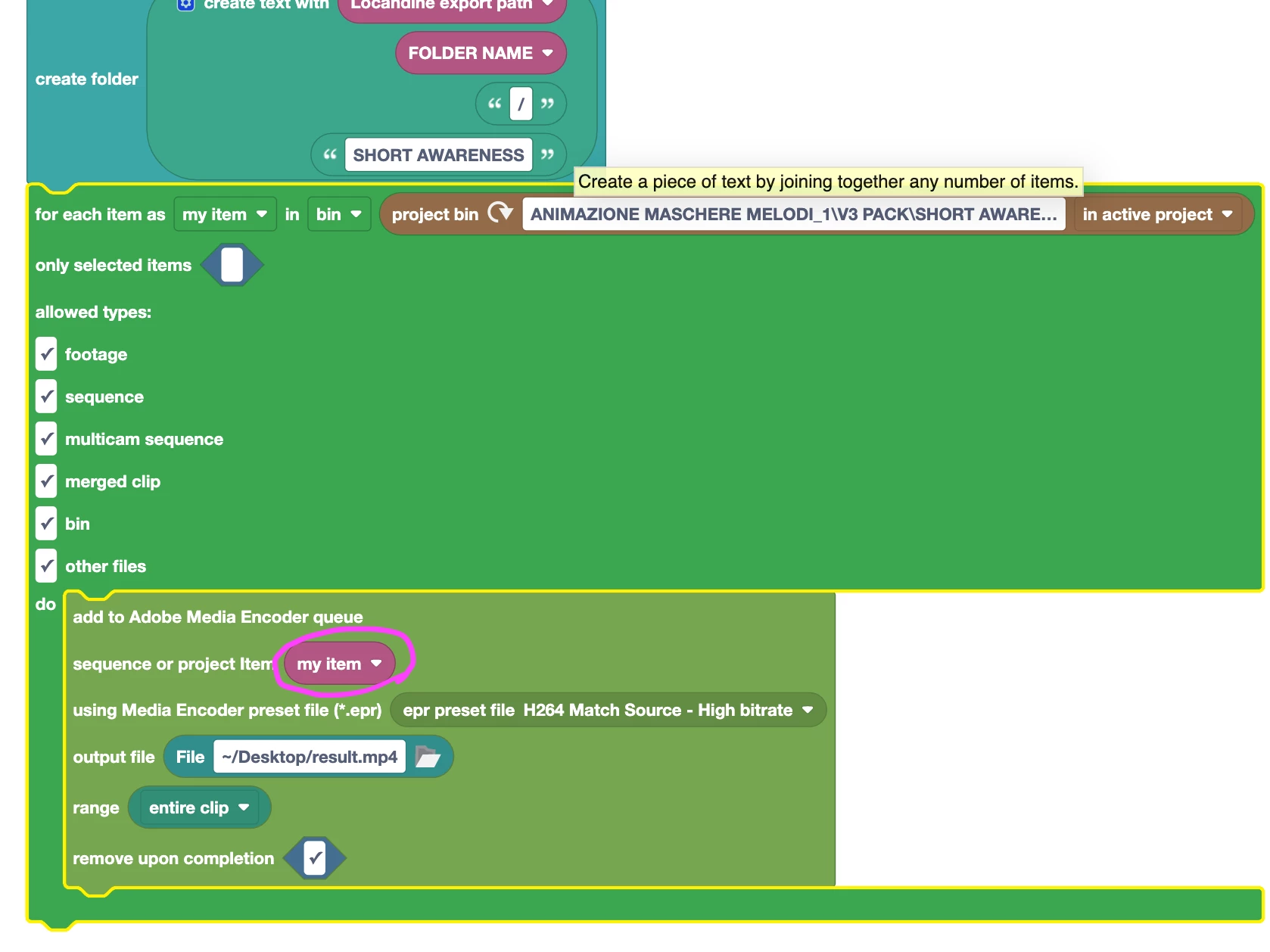


 Thank you so much for your attention.

This topic has been closed for replies.

1 reply

Mathias Moehl
Community Expert
Community Expert
February 29, 2024

Hi @HAVAX,

you are correct that "my item" is temporarily replaced by each item in the chosen bin. In other words, in your code the "add to Adobe Media Encoder queue" block is executed many times - one time for each of the items - and each time "my item" is replaced by a different item in that folder.


I think the issue here is the filtering. The "for each item" block contains these checkboxes to decide, which items you actually want to process. Since you also checked "bins" and "other files", Automation Blocks will try to send any subbins or text files, for example, to Adobe Media Encoder, too. But since Media Encoder can only render footage and sequences, this will fail.

See attached screenshot:

Mathias Möhl - Developer of tools like BeatEdit and Automation Blocks for Premiere Pro and After Effects
HAVAXAuthor
Participant
February 29, 2024

Hey i don't think that is the issue, i tested every single combination o those checkboxes and it still it is not executing properly.

 I also checked the console and it says this: ''execution result:"TypeError: null is not an object (line 6)'', still can't find the error...

Everything  else in the console seems right to me (filepath, export module, file name ecc)
Thank you for your reply 🙏


(I attached the color code i get for the blocks when i execute the script, maybe you can get some more info with that)

Mathias Moehl
Community Expert
Community Expert
February 29, 2024

I suggest that you add a write to console block before the "add to AME queue" block and use it to output "my Item".

Then in each iteration of the loop it will first print the item to the console before trying to add it to AME's queue. Then you know that the last item it outputs before the error message is the one that causes the issue and you can check if it is an item which actually can be queued.


The block where the execution stops is always highlighted. In your screenshot it looks like the "Send to AME" block is highlighted. If you took that screenshot after the error occurred, then this indicates that the error happened at that block.

Mathias Möhl - Developer of tools like BeatEdit and Automation Blocks for Premiere Pro and After Effects