jack_9558
Participant
March 23, 2026
Question

Automation Blocks: Possible to have it set-up bins within a project

  • March 23, 2026
  • 1 reply
  • 17 views

I set-up lots of premiere projects from scratch and was wondering if Automation Blocks could run a script which will set-up a custom order bin structure within in premiere projects?


Example:

00 SQs

(sub bins) 01 SYNC > 02 STRINGOUTS > 03 Current Edits > 04 Delivery

01 Rushes

02 Audio

(sub bins) Music

03 GFXS

(sub bins) Logos > Sub Styles

04 Stock

(sub bins) Artlist

 

    1 reply

    Mathias Moehl
    Community Expert
    Community Expert
    July 1, 2026

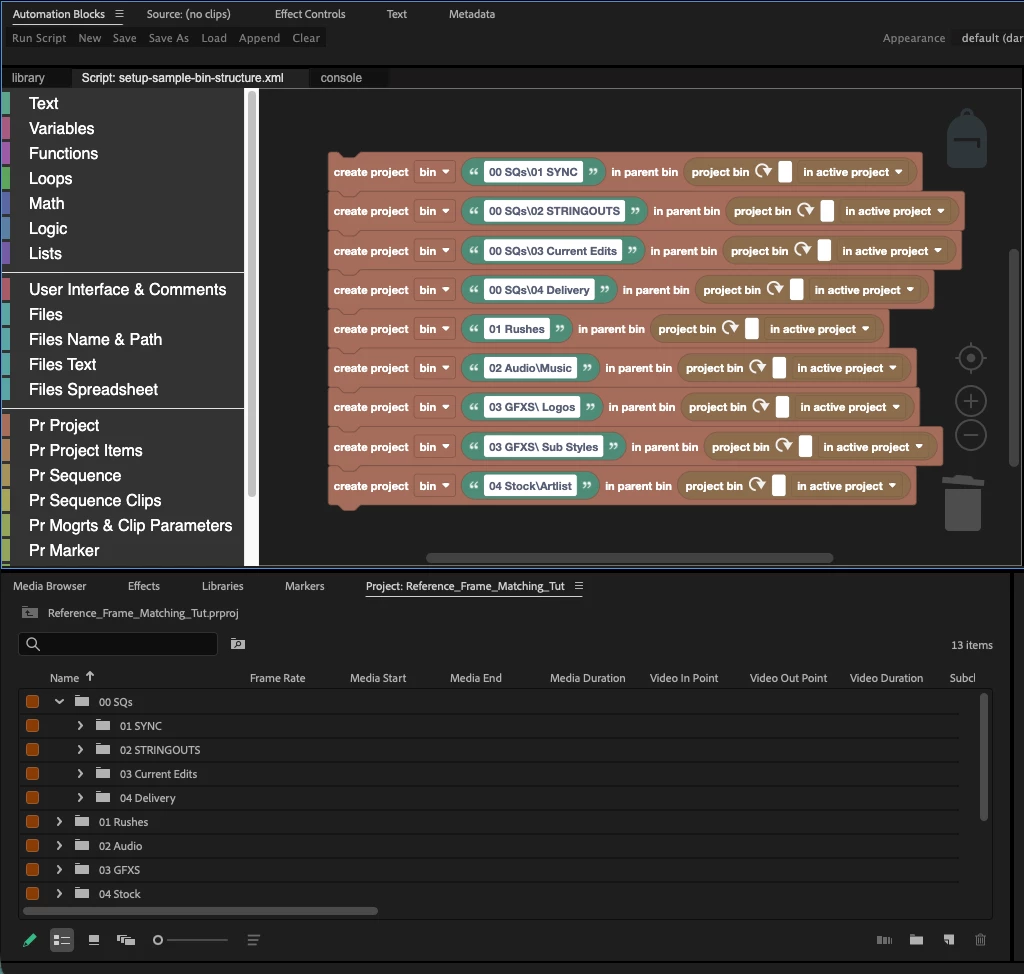
    Yes, this can actually be done very easily by using multiple copies of the Create Project Bin block.

    You don’t have to create the parent bins explicitly. When you create a sub-bin, the parent bin is created automatically if it doesn’t already exist.

    You also don’t need to worry about running the script multiple times, because the block will not create duplicate bins if they already exist.

    I’ve attached the script from the screenshot above. It creates exactly the bin structure you described, so you can load it directly into Automation Blocks and run it.

    Sorry for the very delayed reply. Since the forum migration, I apparently stopped receiving notifications for some Automation Blocks questions, so I’m only catching up on them now.

    Mathias Möhl - Developer of tools like BeatEdit and Automation Blocks for Premiere Pro and After Effects