
Inspiring
April 25, 2024
Answered

Automation Blocks - Renaming Correct Clip

  • April 25, 2024
  • 1 reply
  • 310 views

Hi Team.

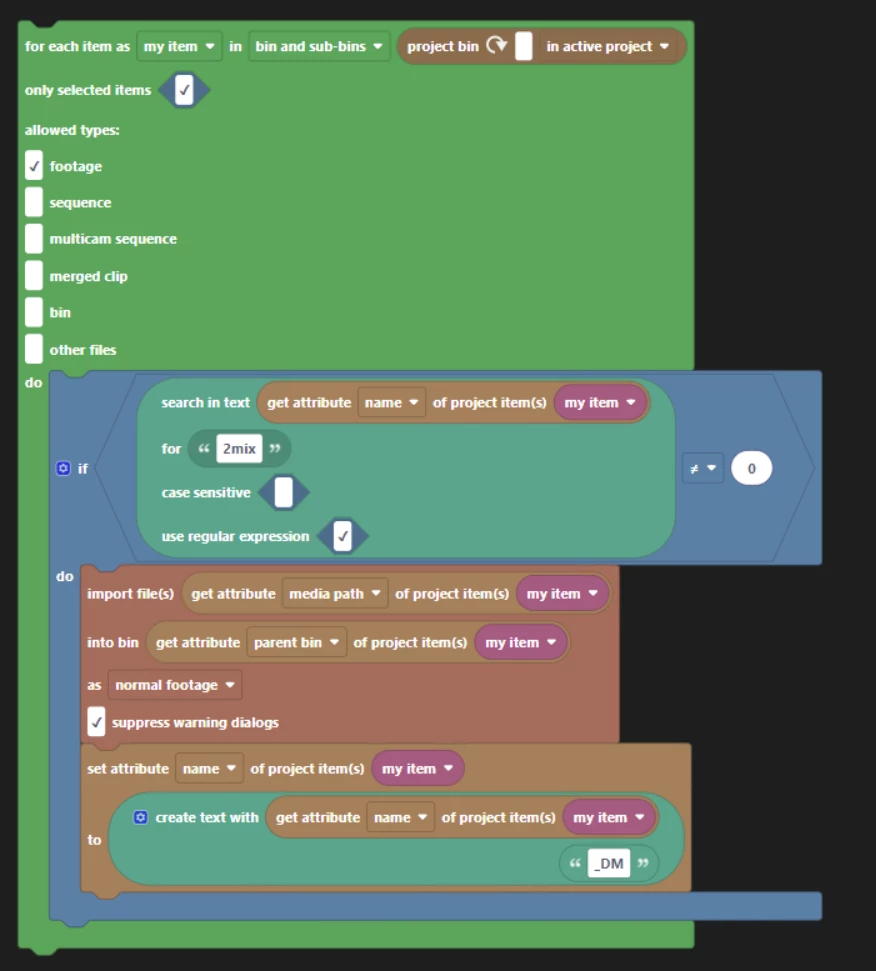
The below script looks for any selected items with the word "2mix" in the file name and imports a new copy of that item. It then adds "_DM" to the name of the original item.


I want it to add "_DM" to the newly imported version of the item, but I can't figure out how.
Any ideas...
This topic has been closed for replies.
Correct answer Mathias Moehl

If you have two items with exactly the same name in exactly the same bin, Automation Blocks will always use the first one it finds - I think this is always the older one, but not 100% sure.
I think the best solution would be to create some temp bin, then
- import the new item in the temp bin
- rename the item inside the temp bin
- move the item into the target bin

1 reply

Mathias Moehl
Community Expert
Mathias MoehlCommunity ExpertCorrect answer
Community Expert
April 25, 2024

If you have two items with exactly the same name in exactly the same bin, Automation Blocks will always use the first one it finds - I think this is always the older one, but not 100% sure.
I think the best solution would be to create some temp bin, then
- import the new item in the temp bin
- rename the item inside the temp bin
- move the item into the target bin

Mathias Möhl - Developer of tools like BeatEdit and Automation Blocks for Premiere Pro and After Effects