
Inspiring
December 6, 2024
Answered

Automation Blocks - Sequence and Assets in Different Projects within Production

  • December 6, 2024
  • 1 reply
  • 1928 views

Hi @Mathias Moehl 


The attached script scans the active sequence for a clip with the word "Bug" in its name and replaces that clip with a similarly named clip that lives in the same bin. (Bug_16x9_UHD becomes Bug_16x9_Youtube).


The script works when my sequence and clips live in the same project.


BUT... in my Adobe Productions workflow, the bugs live in one project and the sequences live in a different project within the same Production.


Automation Blocks seems to not be able to find the parent bin of a clip when it doesn't live in the same project as the sequence.


Any ideas?
This topic has been closed for replies.
Correct answer Mathias Moehl

Hi Sam,


best attach screenshots to your questions, such that me and others can understand the question quicker.


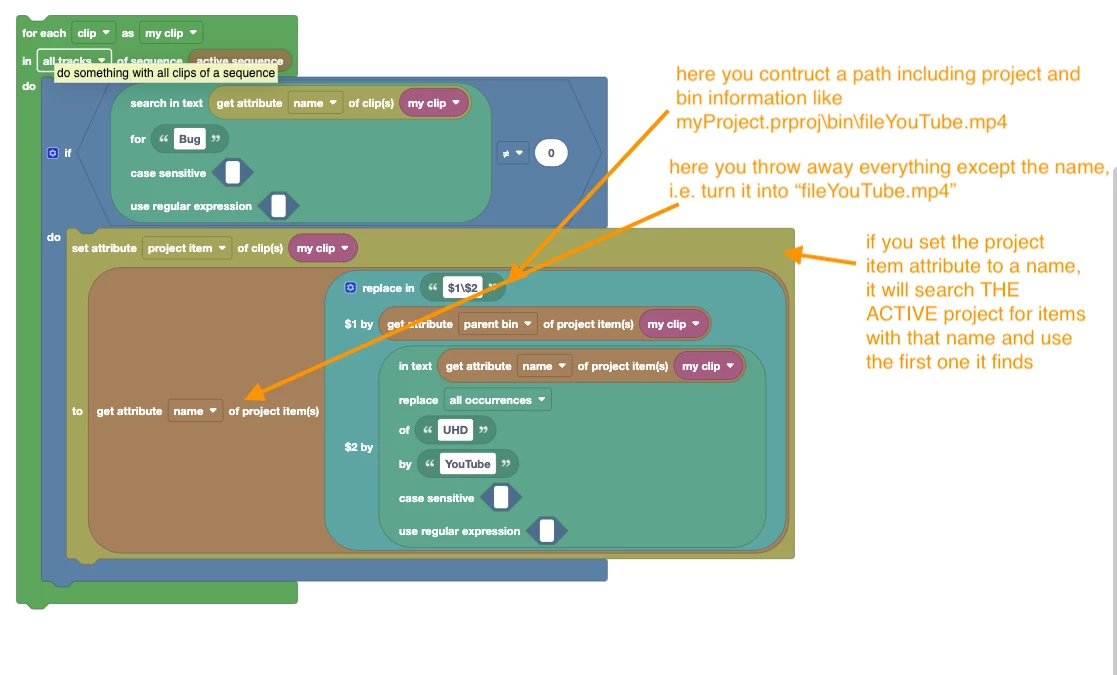
Here is a step by step explanation what your code is doing:


If you want to find the project item in all open projects, you need to loop over all open projects and all items within them explicitly until you found one with that name. Or, if you know in which project and in which bin it is, you can construct the path for that directly (i.e create a string as shown at "Path with project" here:https://docs.mamoworld.com/automation-blocks/block-reference/prProjectItems#accessProjectItem ).

1 reply

Mathias Moehl
Community Expert
Mathias MoehlCommunity ExpertCorrect answer
Community Expert
December 6, 2024

Hi Sam,


best attach screenshots to your questions, such that me and others can understand the question quicker.


Here is a step by step explanation what your code is doing:


If you want to find the project item in all open projects, you need to loop over all open projects and all items within them explicitly until you found one with that name. Or, if you know in which project and in which bin it is, you can construct the path for that directly (i.e create a string as shown at "Path with project" here:https://docs.mamoworld.com/automation-blocks/block-reference/prProjectItems#accessProjectItem ).

Mathias Möhl - Developer of tools like BeatEdit and Automation Blocks for Premiere Pro and After Effects
Inspiring
December 6, 2024

Thank you! That path with project allowed me to make progress.

Is there a way for Automation Blocks to retrieve the parent bin of a sequence clip when the sequence clip lives in different project than the sequence? I know what project the clip will be in, but the exact bin varies depending on what assets I'm trying to swap out and would need to be retrieved by the current clip in the sequence.

Mathias Moehl
Community Expert
Community Expert
December 8, 2024

Have you tried to use the Get Attribute of Clip, to retrieve the project item of the clip, and then use the Get Attribute of Project Item to retrieve the parent bin?


Mathias Möhl - Developer of tools like BeatEdit and Automation Blocks for Premiere Pro and After Effects