
Participating Frequently
June 21, 2021
Question

AVI files fast forward and freeze in Premiere Pro

  • June 21, 2021
  • 4 replies
  • 2413 views

Recently I updated my Mac from Sierra to Big Sur and my Premiere Pro from the 2017 version to the most recent 15.2.0.

I film a lot with an old handycam that produces AVI files like this:
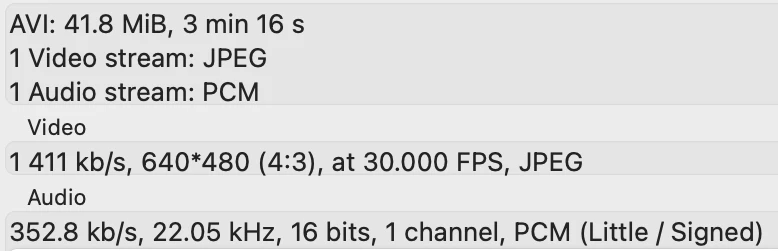


Before the update I never had any trouble with this footage in Premiere (it wouldn't play in Quicktime but that never bothered me). Now, after the update, the video of my footage is fast forwarded and at some point frozen, while the audio is fine. I get tons of errors like this:


Error retrieving frame *** at time **:**:**:** from the file ***


After some research I found several solutions:


1. Change the playback engine to Software only

-> This didn't work for me.


2. Delete existing media cache

-> This didn't work for me. I haven't tried assigning a SSD drive as media cache drive, but I don't think my problem has anything to do with cache.


3. Create proxies for the files

-> This didn't work for me. The proxies that Adobe Media Encoder creates have the same problems with fastforwarding and freezing. And most importantly when I do an export the video files are still corrupted.


4. Transcode the files to another format

-> This works for me but it compromises the (already quite poor) quality of the AVI files. I use ffmpeg to do this.

Question is: are there any other possible solutions to this problem?


I've seen people post about downgrading their version of Premiere or Quicktime, but I feel that's only gonna postpone confronting this problem in the long run (as I do want to keep using this little handycam).

Thank you in advance!

This topic has been closed for replies.

4 replies

Averdahl
Community Expert
Community Expert
June 24, 2021

AFAIK, the MJPEG codec is Windows only and has always been. When i sold Blackmagic Design cards 14 years ago  the MJPEG codec that came with the cards drivers were Windows only.


So best results will be achived transcoding those files on a Windows machine to let´s say Apple ProRes. 


You can also try Shutter Encoder encoding|converting video FREE PC|Mac and compare the results.

Melle0D4CAuthor
Participating Frequently
June 25, 2021

Thanks for the insights.

I'll try out the Shutter Encoder. Transcoding the footage on a Windows machine is one bridge too far for me as I keep producing new material with my "MJPEG camera" every week and I don't own a Windows machine.


I'll post my findings here.

Jeff Bugbee
Community Expert
Community Expert
June 23, 2021

I have not used MPEG Streamclip in a while, but can you see if you can convert the files with this? http://www.squared5.com/

Can also try Handbrake https://handbrake.fr/


Melle0D4CAuthor
Participating Frequently
June 24, 2021

Thank you. So far ffmpeg gets me better results than Handbrake. I'm gonna try MPEG Streamclip. I'll post my conclusion here.

Jeff Bellune
Legend
June 21, 2021

See if Quicktime Player in Big Sur will play the files properly. If not, we need to explore other solutions.

Melle0D4CAuthor
Participating Frequently
June 22, 2021

No, Quicktime doesn't play any of the files properly. But Quicktime didn't do that runnung Sierra either, while they were perfectly fine on Premiere Pro 2017.

Ann Bens
Community Expert
Community Expert
June 21, 2021

What device did you use to capture the files.

An handycam file would have been a mov, 720x480, 29.97 interlaced and about 25 mbps and not mjepg? 640x480 , 30 fps, 1411 kbs.

Melle0D4CAuthor
Participating Frequently
June 21, 2021

My apologies, I didn't mean a Sony Handycam.

It's a handy little camera called Thomson Camescope DV-037. I just take the files right off the SD-card.

Ann Bens
Community Expert
Community Expert
June 21, 2021

Well, that explains it. I was expecting a tape camera.

Big Sur dropped a lot of support on video formats.

Use MediaInfo to analyze clip and post outcome in treeview