
Participant
June 25, 2022
Answered

AVI type Error Code 19 When Rendering a sequence

  • June 25, 2022
  • 6 replies
  • 7022 views

Hi All - Would appreciate if anyone can please assist with fixing this error message when I render a sequence clip in Adobe Premier, see error message below.

PC Windows 64bit platform. Have installed the latest Adobe Premier Pro update.
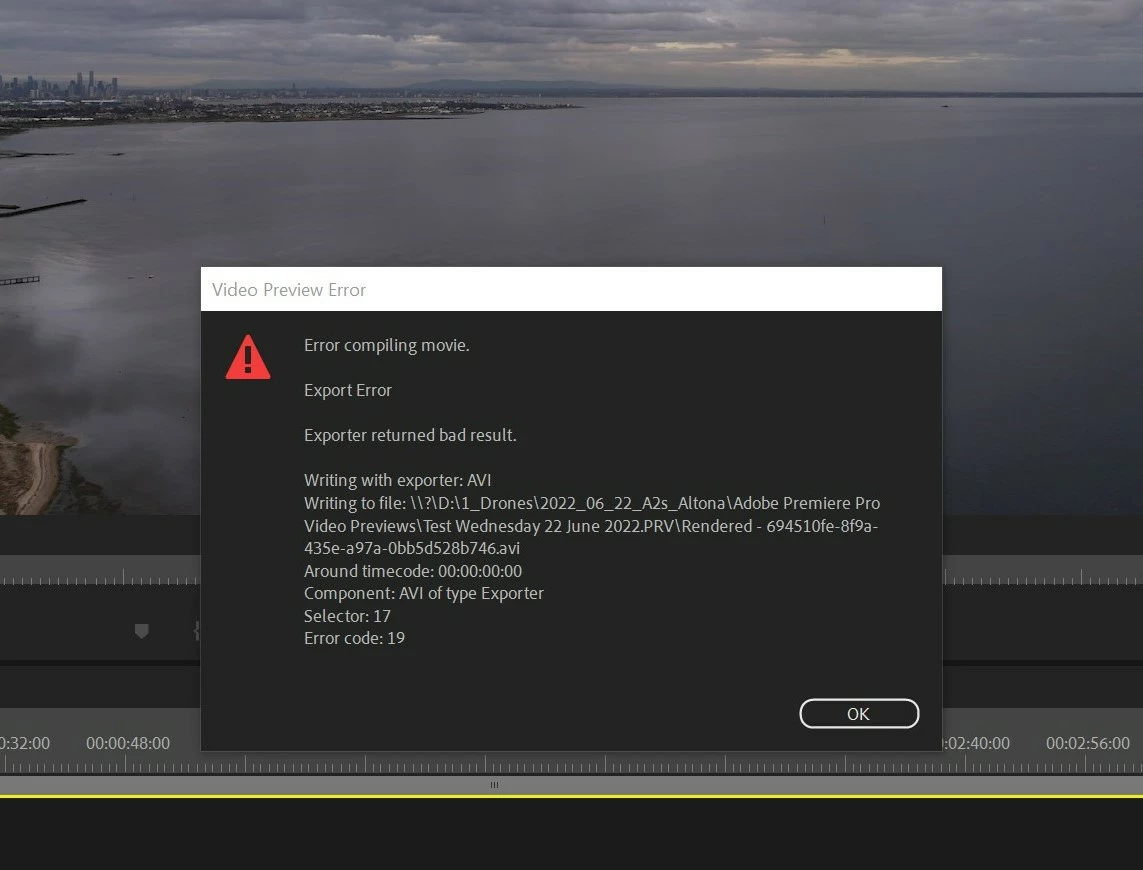
 

Thanks in advance!

Dennis


This topic has been closed for replies.
Correct answer Dennis234027523zli

Hi Ann. Thank-you for replying!! I'm only a newbie to Premier Pro.

It was only a few days ago I updated to the latest Premier update and did not have any issues with sequence rendering, but i think I've sorted it out.

I removed 'AVI' in the Sequence Settings under 'Preview File Format' and used 'I Frame Only MPEH' and changed Codec to 'MPEG I-Frame' and that seemed to work now. For some reason i don't understand how 'AVI' was used in the first place as I have never used it & not in my other video files.

Anyway - It's all good now & thank you again for prompting me to check the 'Sequence Setting'.

Regards,

Dennis 


6 replies

Participant
September 1, 2022

Out of no where I started having this problem very annoying to have to go into sequence settings and choose I-Frame. So I found where microsoft avi was and deleted it for PC it was here C:\Program Files\Adobe\Adobe Premiere Pro 2022\Settings\EncoderPresets\SequencePreview\9678AF98-A7B7-4bdb-B477-7AC9C8DF4A4E

Kevin J. Monahan Jr.
Community Manager
Community Manager
September 1, 2022

That works, bussey88. I prefer ProRes LT, but you need to set Editing Mode to > Custom. For the video preview section, you can choose QuickTime > ProRes LT or 422. It depends on whether you want to use render files to assist your export or not.


Thanks,
Kevin

Kevin Monahan - Sr. Community and Engagement Strategist – Adobe Pro Video and Audio
Participant
September 1, 2022
Thanks! for the insight.
Participant
August 18, 2022

Thankyou both for the fix, it was the last of many methods I tried. If admin could add this fix to the generic 

"How to fix issues that cause errors when rendering or exporting" forum which happens to be the top result when searching "error code 19", "Error while compiling", I think that could be of help to a lot of people like myself in the future from having to wade through to many similiar forums.
Thanks again.
Kevin J. Monahan Jr.
Community Manager
Community Manager
August 18, 2022

I'll see what I can do for the community, Dougla. Thanks for the suggestion.


Kevin

Kevin Monahan - Sr. Community and Engagement Strategist – Adobe Pro Video and Audio
Participant
August 17, 2022

Thank you so mutch you save my but

Participating Frequently
July 9, 2022

Dennis, had the same issue and your work around fixed it. I thank Ann for mentioning it to me in my post then I searched and found your post as well! Thanks to you both!

Participant
June 29, 2022

Dennis,

Had this exact same issue and this fixed it... Thanks!

Participant
July 13, 2022

Lester - Happy you found my post useful. I started thinking if i was the only person having the same issue. I had never had this issue prior to the latest update.

I've tested a few new sequences and guess what .. the 'AVI' for some reason always comes up..so annoying!! I've just learnt to check the sequence and change it.. I really hope the next update they fix this bug!

Ann Bens
Community Expert
Community Expert
June 25, 2022

Avi is usually not the way to go.

Post screenshot sequence settings and properties clip used.

Latest update is not a version: post Premiere version and build and comp specs with all drives.

Dennis234027523zliAuthorCorrect answer
Participant
June 25, 2022

Hi Ann. Thank-you for replying!! I'm only a newbie to Premier Pro.

It was only a few days ago I updated to the latest Premier update and did not have any issues with sequence rendering, but i think I've sorted it out.

I removed 'AVI' in the Sequence Settings under 'Preview File Format' and used 'I Frame Only MPEH' and changed Codec to 'MPEG I-Frame' and that seemed to work now. For some reason i don't understand how 'AVI' was used in the first place as I have never used it & not in my other video files.

Anyway - It's all good now & thank you again for prompting me to check the 'Sequence Setting'.

Regards,

Dennis 


mr Bolt
Participant
July 16, 2022

Same issue and your suggestion fixed mine as well.  No idea how my preview format got set to AVI  🤷‍♂
Thank You!