
Participant
November 29, 2024
Question

Background text off-centered in Essential Graphics

  • November 29, 2024
  • 5 replies
  • 1297 views

Hi all!

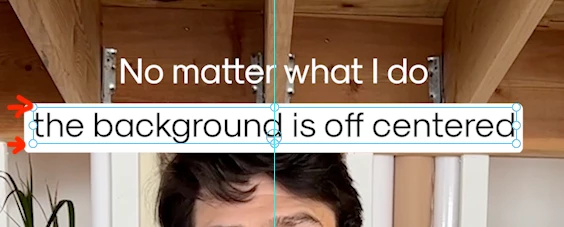
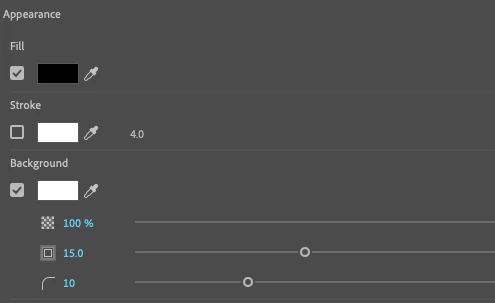
I'm trying to replace our mogrt templates using text-linked styles to make it easier for our editors to apply our clients' approved fonts/colors/styles, but I ran into this issue that's driving me crazy. When I toggle on the background on the Essential Graphics panel, the background has more space on the bottom and looks off. I can't find a way to adjust it to make it centered.


Needless to say, I can't use any random fonts since each client has its brand-approved ones. This makes the text-linked style feature useless for my use case.


I'm trying to avoid using mogrts as much as possible since they slow down our editor's systems unnecessarily.


Any recommendations?


Thanks for your help.


Mario

This topic has been closed for replies.

5 replies

jstrawn
Community Manager
Community Manager
December 4, 2024

I was re-assigned from Pr Graphics to a different PrPro dev team a while back so I don't get to browse Graphics specific topics on the forums nearly as much as I used to. So, sorry if I'm too late to this discussion. Let me respond to a few things I read above:
(1) What you @Mario37140797pky9 are seeing is an inherent of how fonts or designed and displayed in most Adobe apps. The background is using the center of the text string to determine how the background fits behind it. This is affected by ascenders and descenders, which very in length by font.
Note: Ligatures are when two characters become joined, like Th and ff and only happen with certain fonts. @R Neil Haugen 
(2) Pinning (aka Responsive Design - Position) is the correct approach to allow you to center the background yourself because then you will have two separate layers... a text and a shape. For a single lien of text, make a background shape and then pin the text to it on the left and right sides. That way your editors can change the text string and the width of the shape will respond to stayed center. You can always move the y position up or down a little to keep that part centered without affecting the pinning. It;s kind of hard to explain how it all work, but if you just try it, it should be pretty intuitive.
(3) You can still make mogrts our of Pr Graphics with pinning and they should require minimal tweaks by the end users to keep them looking right.


R Neil Haugen
Legend
December 4, 2024

James ... thanks for both the corrections and the information on using pinning. 

Everyone's mileage always varies ...
Community Expert
December 2, 2024

To center and align background text accurately in Essential Graphics, you can use a shape layer with Responsive Design.

Here's how:

  1. Create a new shape layer sized to match your desired background dimensions.
  2. In the Properties panel, select this shape layer and scroll down to the Responsive Design section.
  3. Set the Pin To option to your text layer. Then, click the center of the box next to the dropdown to pin all sides of the shape to the text layer. This will dynamically adjust the background as you add or remove text.


For more detailed instructions, you can refer to Adobe's official guide on Responsive Design features.

Stan Jones
Community Expert
Community Expert
December 2, 2024

@PaulMurphy,


Thanks!


I have not played with the responsive design. I did a quick test. I started with text with no descenders, turned on the auto-background, matched a shape to it, and set the responsive design as you indicate. If I add a descender letter, the auto-background adds about 25 pixels (in a 1080 sequence). The responsive design adds about 12. So it is an improvement in terms of what @Mario37140797pky9 wants.


But he is trying to automate this without mogrts. A text style won't add a shape, right? But maybe a simple mogrt adding a text layer and a shape pinned to it?


Stan


Kes Akalaonu
Inspiring
December 2, 2024

A text style can't hold a shape but a Premiere MOGRT saved to the Graphics Templates can

Stan Jones
Community Expert
Community Expert
November 30, 2024

The solution is to use only words with letters with no descenders nor ascenders. lol. And yes, the challenge of centering text on a background is one of the reasons that small caps fonts gets used.


The solution is more complicated than it appears, and the current reality is that the "automatic" background setting does not allow enough control. But the other problem is that there is no single setting that works all the time.


Note that the best comparison of the various options is with the text box NOT showing.


And consider the background for a word with only base characters (e.g. "ounce"). It is not as tall as the background for a word with only descenders (e.g. "grape") nor only ascenders (e.g. "this"); but those two are the same size. But they do not line up!


Here was an interesting discussion of this:

https://community.adobe.com/t5/premiere-pro-beta-discussions/offset-position-control-for-text-appearance-background-in-essential-graphics-panel/m-p/11052752#M213


@jstrawn @Kes Akalaonu Any thoughts? Is pinning something that can be used in a mogrt? In a text style?


Stan


Kes Akalaonu
Inspiring
December 1, 2024

From experience, this feels like After Effects lane than Premiere's Essential Graphics options tbh

Participant
November 29, 2024

Hey Neil, thanks for your answer!


Unfortunately, it does. At this point, I have browsed through hundreds of posts on Reddit and various other forums, and it seems that everyone has resolved this issue by using specific fonts that don't cause problems. However, in my case, that's not an option. 


R Neil Haugen
Legend
November 30, 2024

Yea, like Stan says so well, the whole balancing text against the background box is quite a design consideration. Which graphics design artists state as a reason 'amateurs' should leave graphics/text design to them.


I dunno about you, but I ain't got that budget ... 😉

Everyone's mileage always varies ...
Participant
November 30, 2024

Yeah, I know. The thing is that this issue is limiting the functionality of a really cool feature that could potentially save a ton of time to a lot of users. Kinda defeats the purpose.

R Neil Haugen
Legend
November 29, 2024

I think that is the space designed to allow for "ligatures", the parts of letters like lower case p & g, that go down below the line.


If you add those, does it still look "off"?

Everyone's mileage always varies ...