Answered
Backwards?
Hi,
I've never made a film or edited before but I need to know how do I reverse (make it run backwards) a short film (60 seconds) that I've just put together? many thanks, Michael

Hi,
I've never made a film or edited before but I need to know how do I reverse (make it run backwards) a short film (60 seconds) that I've just put together? many thanks, Michael
Does your edit contain a bunch of clips?
If so, duplicate the sequence in the Project Panel, then working on the copy of the sequence:
1) Select all the clips in the timeline (click anywhere in the timeline and then type Command (Control) + A.
Once selected, right click (control click) on any one of the selected clips and from the drop down menu choose Nest.
Name and make the Nest.
2) Once the nest is made (it will appear as one solid green clip on your timeline), right click (control click) on it and from the drop down menu choose Speed/Duration.
When the Speed/Duration pane opens, click the box for Reverse and then click OK:
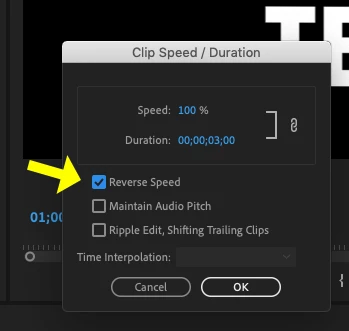
Your edit should now be playing in reverse on the timeline. Depending on the horsepower of your computer, you may need to Render the timeline in order for it to playback smoothly.
MtD
Already have an account? Login
Enter your E-mail address. We'll send you an e-mail with instructions to reset your password.
 AdChoices