
Participant
July 5, 2020
Answered

BASIC 3D NOT APPEAR IN THE EFFECT LIST

  • July 5, 2020
  • 2 replies
  • 2873 views

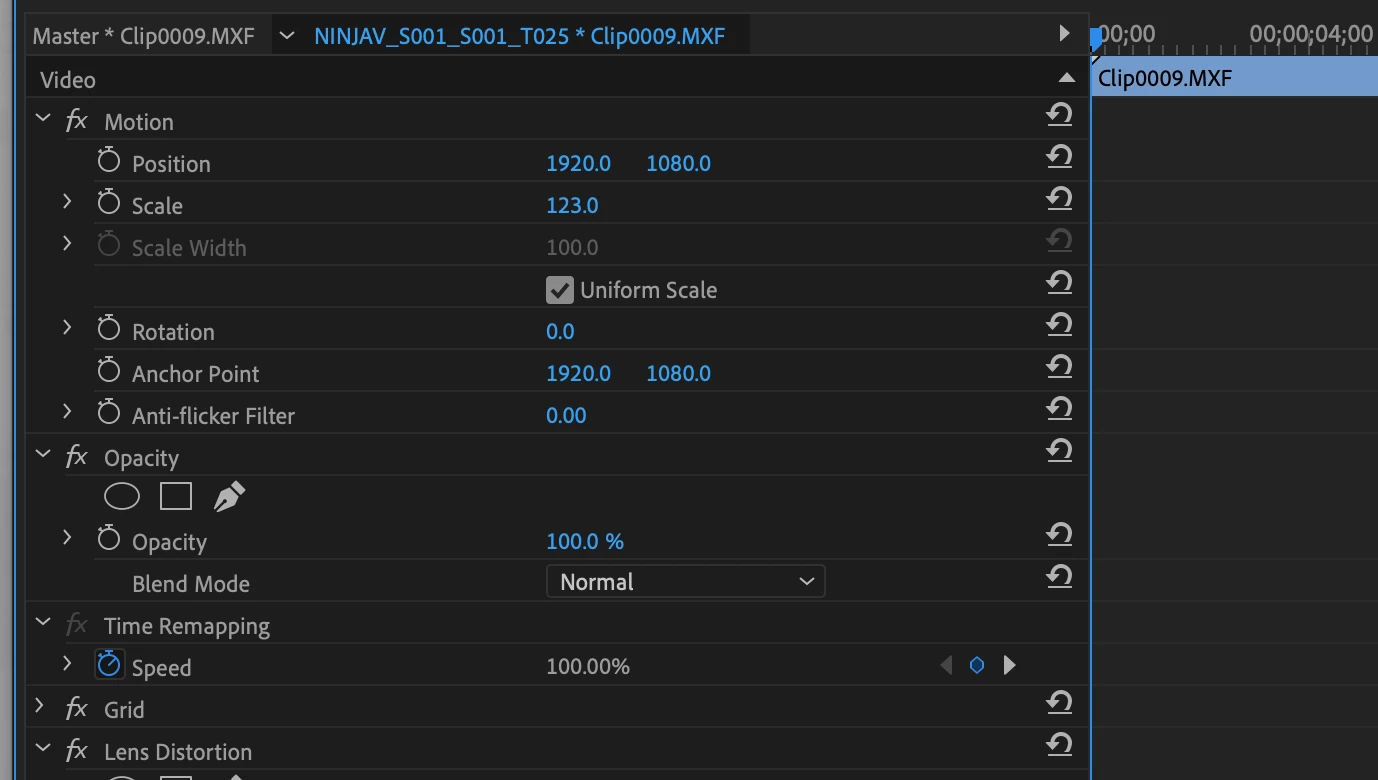
Im using the primere pro, but the basic 3d effect not appear.
The available effects is: Moviment, Opacity and Time Remap.
Where is the Basic 3D? I need to animate a image but i dont find!


OBS.: Sorry about my english.
This topic has been closed for replies.
Correct answer Meg The Dog

Position, Scale, Rotation controls can be found by clicking on the Caret next to the word Motion to disclose the controls:

If you need the actual Basic 3D effect, it is located in the Effects Panel, Effects > Video Effects > Perspective > Basic 3D and will need to be applied to the clip you want to work on - once applied the controls for it will appear in the Effect Controls panel.


MtD

2 replies

Participant
July 5, 2020

thx

Meg The DogCorrect answer
Inspiring
July 5, 2020

Position, Scale, Rotation controls can be found by clicking on the Caret next to the word Motion to disclose the controls:

If you need the actual Basic 3D effect, it is located in the Effects Panel, Effects > Video Effects > Perspective > Basic 3D and will need to be applied to the clip you want to work on - once applied the controls for it will appear in the Effect Controls panel.


MtD