name is already taken
Known Participant
September 3, 2020
Question

basic color correction vs rgb curve

  • September 3, 2020
  • 6 replies
  • 1561 views

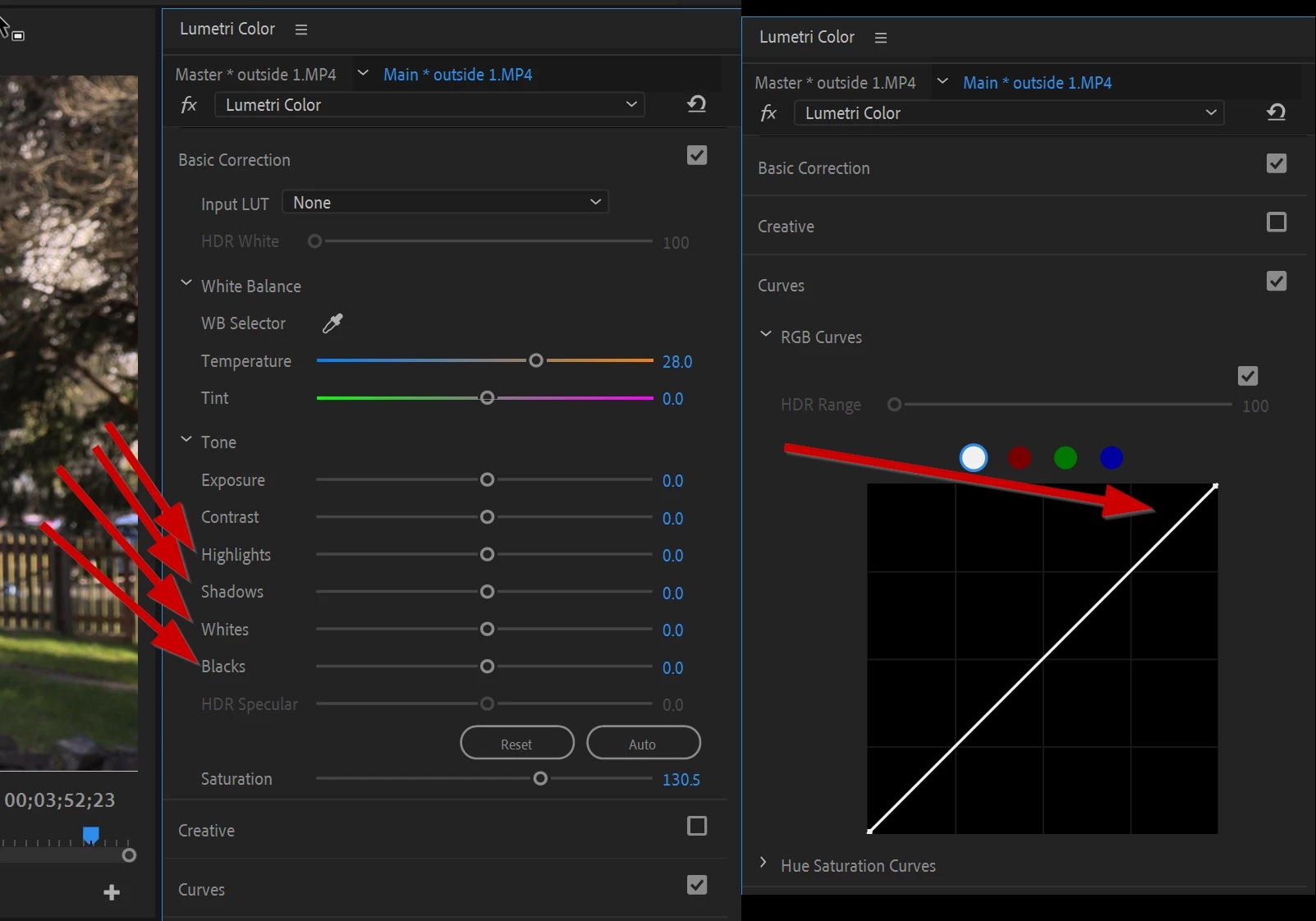
Are changes made to the basic corrections shadows, highlights, whites, and blacks any different than the rgb white curve? Is it just a different interface for the same functionality? 
This topic has been closed for replies.

6 replies

Inspiring
September 5, 2020

everything boils down to definition and agreement with language and communication ( and media ).

I'm not smart ( implies big know it all brain ) but I'm not stupid either ( implies biological challenge to thinking and learning ).

I'm IGNORANT mostly... but strive to be WISE ... and those words imply other things ... mostly some degree of compassion, love, desire to nurture, learn, and become more nice .... NICE is a dumb word to use cause it's not deep enough.


Anyway, you're in good shape and will make stuff that you like .. Adobe is a product that lets you do that.


🙂


Inspiring
September 5, 2020

I think that is the pivot adjustment in resolve maybe... 

It's like you have a rubber band stretched between two fixed points. Now you grab it and pull it to the left. That expands what is to the right and contracts what is to the left.  It's really subtle and before doing that I would go to limit the overall 'overlap' of ' lift gamma gain' ( log alternative ? ). Less overlap, so you can control shadows midtones and highlights more finely. ...sorta maybe....


hehe.. nobody knows what will happen till you get it and look at it and do stuff to it.


name is already taken
Known Participant
September 5, 2020

Asking questions smart people aren't sure how to answer, been a theme in my schooling.

R Neil Haugen
Legend
September 3, 2020

Particularly notable and somewhat odd is the Blacks control in the Basic tab. You'd expect something like a Shadows color wheel or grabbing the bottom of the RGB curve, right?


It's more of a swinging gate pivoting about level 20, sort of kind of. So I only touch blacks to carefully move things a point or two after setting shadows elsewhere.


Here's a post from a couple years back on my blog, covering the actual effects of moving the Basic tab controls. You might look through some of my other posts for more info

on the practical side of using Lumetri.


http://rneilphotog.com/2017/06/lumetri-basic-tab-what-do-the-tonal-controls-really-do/


Neil

Everyone's mileage always varies ...
saffron451
Participant
November 12, 2024

this is an excellent article. thank you for your service!

name is already taken
Known Participant
September 3, 2020

Thanks

R Neil Haugen
Legend
September 3, 2020

The tabs of the Lumetri panel/effect are processed sequentially top-down. So the computations for the Basic tab are separate from the Curves tab, and processed first. The math may well be slightly different, as the controls do not work exactly the same.


Neil

Everyone's mileage always varies ...
Inspiring
September 3, 2020

basically the curve shows up initiall at extreme black and white ( 2 points you see ). Most people do a simple S curve using those 2 points to get within range of acceptable editing. But you can add a gazillion other points on that curve ( or diagnal line you see at first ). That limits and adjusts the relationships to the OTHER POINTS you made... so basically, you can fine tune the curve thing much more fine than the general sliders for shadows, highlights, midtones, etc.  Those controls HAVE to also influence the juxtaposed stuff next to them ( for example, adjusting highlights will also effect shadows ). Using the curve thing you can have more control to target specific levels.


??  At least that's how I feel it works... but I'm not a pro editor so take with grain of salt.


🙂
