
Participant
October 5, 2017
解決済み

Beginner - Moving Video and Audio Tracks

  • October 5, 2017
  • 返信数 3.
  • 16968 ビュー

When I drag the linked clip up a video track, want the audio to follow down to the next track.
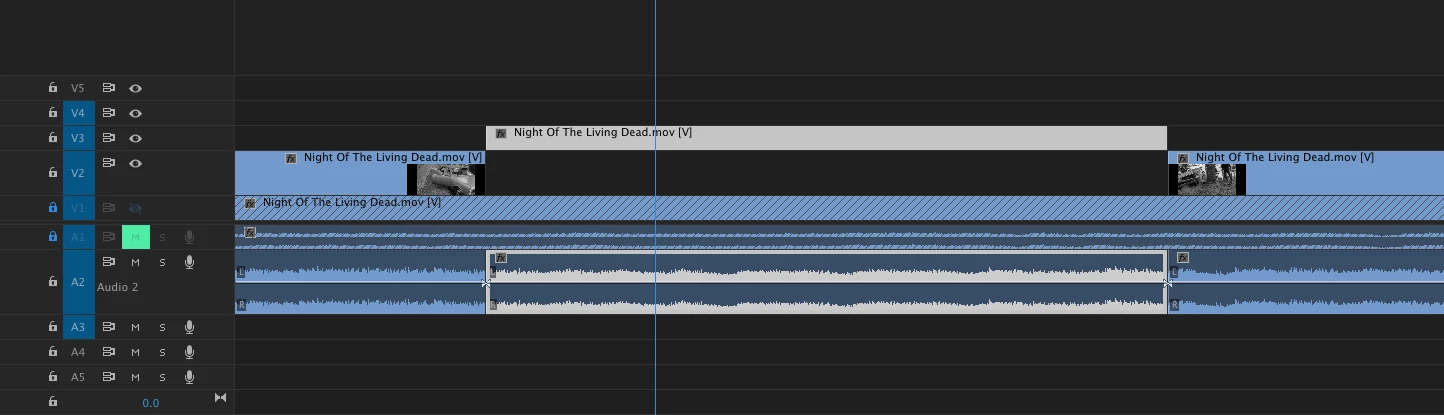
As of now when I drag the video up a track the audio, although linked and selected, stays on the same track as you see in the pic. I need the audio to drop down to another track as well.


Is there a shortcut or something I am missing?


Thanks!

このトピックへの返信は締め切られました。
解決に役立った回答 JPerk10531795

It actually worked and you don't even know how many keyboard combinantion I've tried.

The trick was moving the video up and then without releasing ctrl+shift I moved the mouse cursor down to the audio in order to move it down and in tandem.

It was also written on point number 4 but I was missing the proper key combination.

Thanks a lot again for your quick reply.


Are you guys on Windows? Because on Mac it's cmd + shift.

返信数 3

joe_walker
Participant
November 21, 2018

This actually works like Stefan described just add COMMAND to SHIFT and you can drag down to select which audio track to shift to. Actually better than the way FCP worked because you can target a track rather than it automatically staggering. Tested in version 13.0.1 (2019).

Participant
July 11, 2020

This is correct currently (as of July 2020)!! Thanks!

Participating Frequently
November 25, 2020

And still good as of November 2020!


If anyone is still confused by the process, because it is a little tricky, here you go from another angle.

1. Grab your video clip and move it by dragging it with the left side of the mouse.

2. When you drag it to the correct video track you want it on, keep holding down the left side of the mouse.

3. Now ALSO press and hold the cmd + shift keys too (you should now have the left side of the mouse + cmd + shift all depressed). Holding cmd + shift essentially "locks" the video clip into place and switches to the audio track selection mode. Don't worry, during the next steps your video clip will be 'held in place" on the video track you selected.

4. Now move the cursor to the audio track that you want your audio clip on. You will see a highlight on whatever audio track you are hovering over.

5. When you have the cursor hovering over the audio track you want the audio clip on, let go of everything.

6. You will see that the video clip stayed on the video track you dragged it to, and the audio clip moved to the audio track that you selected!


nicklear
Inspiring
April 4, 2018

is this still working for you in v 12.1.0? It doesn't work for me - the video portion comes back down when I move the audio portion.

What does work which is pretty similar is to drag the video portion of the clip up, let go of the mouse left click, then drag the audio portion of the clip down.

stefan_gru
Inspiring
October 6, 2017

Unlike Final Cut Pro, Premiere Pro does not move linked video and audio tracks up/down the tracks in unison. But you can make that happen by following this simple trick:

  1. Drag your video clip (or clips) up one (or more) tracks (ex. V1 to V3).
  2. Don't let go of your mouse button.
  3. Press the Shift key and hold it down while you move your mouse down towards the audio tracks. This will "push" them down, exactly the way you wanted them to go in the first place.

(I found this tip on Creative Cow courtesy of Joshua Preiswerk in this thread: Audio Clips Don't Move in Tandem with Video Clip.)

Does this tip work for you? I just tried it out and it works for me.

Participant
October 11, 2017

Thank you, very helpful, worked like a charm.