Question
Best export settings for proper scaling? (4k sequence, 1080p deliverable)
So I have a feature-length documentary that is a 4k sequence but I need to make a 1080p deliverable ASAP. In this sequence, I have footage of varying resolutions, some at SD and HD. When I export to 4k Apple ProRes 422 HQ, everything looks fine (relatively). But when I set it to 1080p in Adobe Media encoder or Premiere export, the SD and HD footage looks worse than the original clip. If I create a 1080p ProRes file from a 4k ProRes file, it looks alright, almost identical to the UHD sequence. But I'm trying to save time so I don't have to export a feature film twice, just once from the original sequence. Here's what I'm seeing:
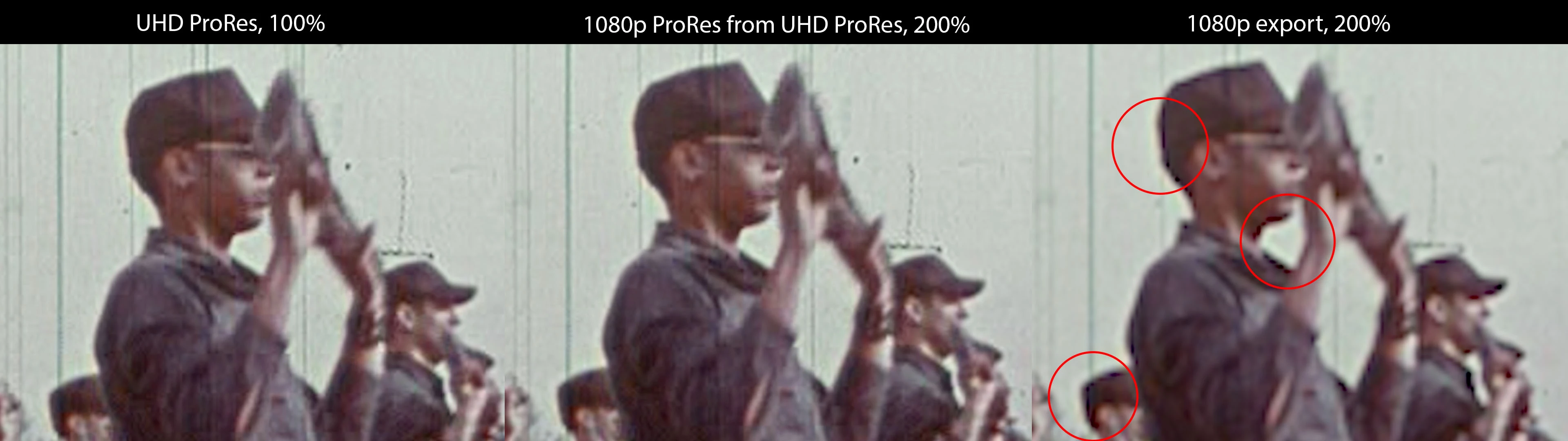
So something is definitely happening with the scaling on export. Yes I know, it will look bad either way lol. But as you can see, there's bad, and there's REALLY bad, and in-motion on the big screen it will be most apparent. Specifically in the aliasing present in Media Encoder / Premiere Pro's scaling. In-motion, the SD footage scaled to 450% in original UHD has no aliasing, it's just blurry. But if I try to save time by exporting my UHD project directly to 1080p, anything that isn't native UHD (including 1080p footage) will have these nasty scaling/sharpening artifacts and less detail. I hope there's a way around that! Perhaps a scaling setting that I need to change in Premiere or Media Encoder?
Yes I know there are up-conversion plugins, but as you can see I'm trying to save time. I have a tight deadline, no budget, and basically no time left. Thank you!
 AdChoices