


Known Participant
August 11, 2017
Question

Best settings for Youtube

  • August 11, 2017
  • 7 replies
  • 6824 views

okay. so i do let's plays. i record the games with Bandicam, in AVI (Jpeg, PCM mode) . and i use premiere for editing. i record in 1080P 60FPS

Now what settings should i use for rendering?

currently i have it on this:
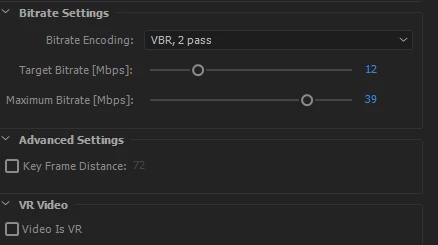
Now i noticed bad quality after uploading. like worse colors, and lot lower clarity.

In the pic i already put the bitrate higher, ( it used to be target 10, and max of 12) and changed VBR 1 way to 2 way.

What is the best settings for youtube, that gives me the highest quality?

should i render on AVI instead? since my original file is AVI. or is h.264/mp4 better?

    This topic has been closed for replies.

    7 replies

    SpirareAuthor
    Known Participant
    August 11, 2017

    well there is a settings for it.

    But it means uploading in 50 fps instead. which isn't as good as 60.. but maybe thats just the downside of living in europe..

    Ann Bens
    Community Expert
    Community Expert
    August 11, 2017

    Rubbish. 50p is just as good as 60p.

    SpirareAuthor
    Known Participant
    August 12, 2017

    not in my book. i see a clear difference between the 2. and it annoys me a lot xD

    Richard van den Boogaard
    Community Expert
    Community Expert
    August 11, 2017

    I use 12Mbps as a minimum - for 25fps video (based in Europe, not USA). If you need more frames (60 in your case) to be represented in similar bitrate, quality is likely to suffer...

    Richard van den Boogaard
    Community Expert
    Community Expert
    August 11, 2017

    What do you have to lose? Try it, you might like it...

    SpirareAuthor
    Known Participant
    August 11, 2017

    i guess so . It does make my video sizes about 4-5x bigger than before. which means i need a bigger HDD if this works.

    SpirareAuthor
    Known Participant
    August 11, 2017

    ohh and i'm actually in Europe aswell. But i record in 60fps. even though my camera itself is 50 (PAL). it still works somehow. probably cause it's only a small image in the video?

    Richard van den Boogaard
    Community Expert
    Community Expert
    August 11, 2017

    Also, don't use 2 pass encoding. This will scatter the information over more different frames, which will not be re-generated by YouTube. Just use 1 pass encoding and up the bitrate so all the information is as much inside the frame... YouTube's encoding engines are built for efficiency, given that so much video is uploaded each second.

    Richard van den Boogaard
    Community Expert
    Community Expert
    August 11, 2017

    If it's not a playback issue, then it must be a matter of YouTube re-encoding the video you uploaded. Best way to get better results is to give the YouTube encoder more information to mess with. In other words, substantially raise the bitrate and see if that helps. Try a Target bitrate of 40Mbps with a maximum of 50Mbps ... or even higher...

    SpirareAuthor
    Known Participant
    August 11, 2017

    a target of 40?! are you sure?

    this help page: Google Groups

    says use 12mpbs for SDR and 15mbps for HDR 1080p 60fps..

    you think it will work with higher than that?

    i used to have 10mbps before.

    Richard van den Boogaard
    Community Expert
    Community Expert
    August 11, 2017

    What browser are you watching the YouTube videos in?

    In order to see 60fps on YouTube, you have to use Google Chrome. Other browsers may not support 60fps:

    YouTube now supports 60fps playback, and video games look amazing - The Verge

    SpirareAuthor
    Known Participant
    August 11, 2017

    i use Firefox which also has 60fps support.

    i tried chrome but it doesn't matter. huge difference in quality before and after uploading

    Ann Bens
    Community Expert
    Community Expert
    August 11, 2017

    mp4 is the way to go.

    You will have to experiment as YT re-encodes. Might want to raise the bitrate quite a bit.

    Some suggest DNxHD if you have the bandwidth to upload a large file.

    SpirareAuthor
    Known Participant
    August 11, 2017

    on the youtube page about it. it says target rate of 12mbps is good. but it doesnt say a maximum.

    i'm not sure. is 2 way VBR helpful? i know it really increases the waiting time for rendering..

    before it was 2x the time of the video for rendering time. now it's about 5-6x the video length.

    anyone already knows the ideal for Youtube? not just on bitrate. but on everything.