Participant
December 11, 2017
Answered

Black Borders after Export

  • December 11, 2017
  • 1 reply
  • 12212 views

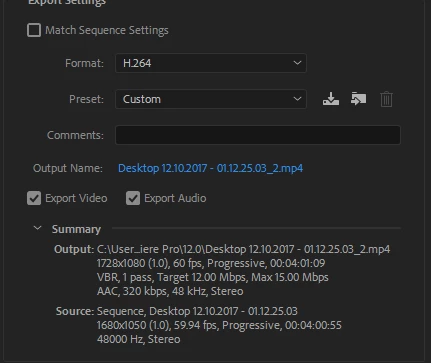
Hi, I come here today asking for assistance. I have a small issue. There are black borders on both sides of my video after I export it. I have no idea how to get rid of it. I have looked around and have not found a solution to this problem. I'm using Adobe Premiere Pro CC 2018.

The video that I have the issue with: Blue Infinity[]Channel Trailer - YouTube

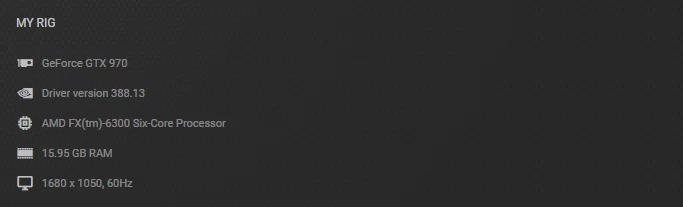
My Pc Specs & Video specs
This topic has been closed for replies.
Correct answer SAFEHARBOR11

You have a mismatch of the frame size in editing Sequence versus what you are exporting.

Editing as 1680x1050 and exporting as 1728x1080. Total mismatch, and neither of those sizes are any known video format. The first one I think is a computer display option, so maybe you are editing screen capture footage?

Should stick with standard sizes like 1080p (1920x1080) or 720p (1280x720) if possible

Thanks

Jeff

1 reply

SAFEHARBOR11Correct answer
Participating Frequently
December 11, 2017

You have a mismatch of the frame size in editing Sequence versus what you are exporting.

Editing as 1680x1050 and exporting as 1728x1080. Total mismatch, and neither of those sizes are any known video format. The first one I think is a computer display option, so maybe you are editing screen capture footage?

Should stick with standard sizes like 1080p (1920x1080) or 720p (1280x720) if possible

Thanks

Jeff

Participant
December 11, 2017

Hi Jeff,

Yes! I am using a screen capture footage. I was using Nvidia's screen capture software. The source is my (what windows says) is my 1st monitor. It won't go above 1680 x 1050(as seen below). I'd use the one above it but it goes blurry and makes for crap quality.