
Participant
May 20, 2020 1:28 PM UTC
Question

Black box in center of clips after linking media
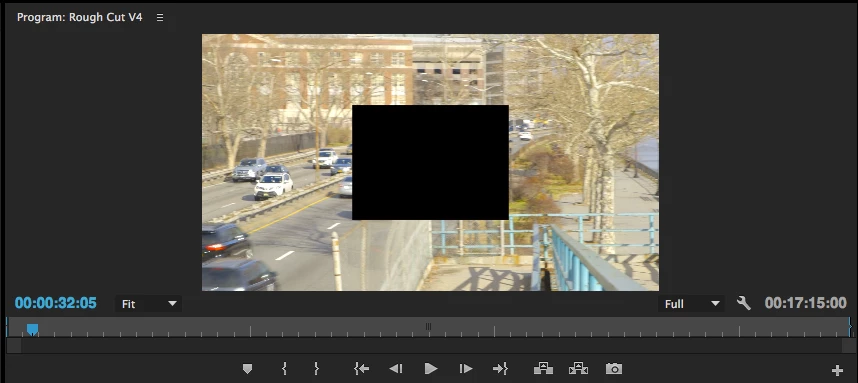
 

I'm working from an XML in Premiere Pro CC 2015. After linking the media (.mts files) I can review clips in the source monitor and they look fine. However, in the program monitor, when reviewing the sequence in my timeline, there is a black box in the center of every frame of every clip which fills about half the frame. It remains even afer rendering. How can I correct this? 


This topic is closed to new replies. Start a new post to keep the conversation going.

5 replies

Participant
Apr 14, 2023 3:20 PM UTC

I had the same issue, I had several nests under a adjustment layer and a black video at bottom. I removed the black video on track one and the adjustment layer and that solved the problem. Not sure what Cassie's it but there your fix (using a Mac)

Translate
Participant
Nov 27, 2021 10:46 AM UTC

I encountered the same problem, and I figure it out that the black box could be the ERROR FROM THE ADJUSTMENT LAYER in the sequence. Turn off the layer of Adjustment layer to see if that is the problem.

Translate
Participant
Jun 20, 2021 9:59 PM UTC

Hey there, did you ever find a solution to this problem? Having the same problem trying to get color correction from a DaVinci XML to work...

Translate
Participant
Feb 3, 2022 5:09 AM UTC

Hey I'm having the exact problem with importing xml color grade file from davinci to premier pro timeline..any solution?

Translate
R Neil Haugen
Legend
May 20, 2020 5:08 PM UTC

You think there would need to be a masked area or picture-in-picture or something that would show in the ECP ...


Neil

Translate
Everyone's mileage always varies ...