
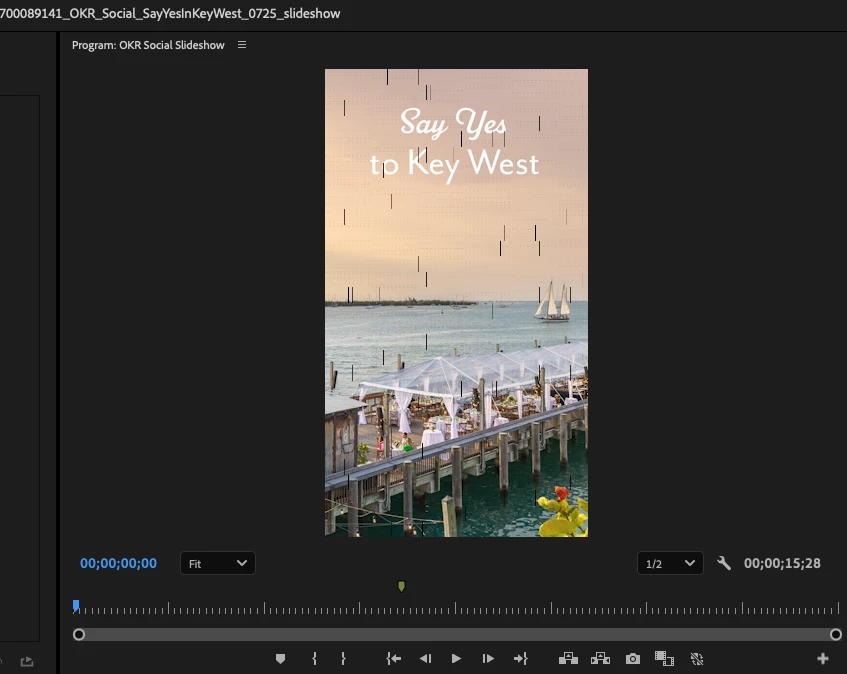
black vertical lines appearing both in editing and export
Hi all, this is my first time posting here so please bear with me if this is too much info or seen as a simple problem. It's not simple for me as I've spent over 2 hours trying to solve it 😞
I'm making a 15s slideshow only using photos that are all under 12 MB each for an IG story (1080x1920). The black vertical lines begin on the third photo/at 8 seconds. There's no reason I can think of that explains why I'm having this many playback issues with a project this small. I've gone through all related posts and tried multiple solutions, listed below. Nothing works. After I replace the "footage", the lines will temporarily disappear even though I didn't render again yet and the bar above the clip is red. But once I render the sequence they appear again after all bars above clips are green/rendered.
What I've tried so far:
- Replacing the problem "footage" (photo in this instance) multiple times
- changing from CUDA to Software Only Rendering based on advice from this post (OpenCL isn't showing up as an option for me)
- deleting my cached files
- removing all effects/attributes and reapplied them multiple times
- using Media Encoder to render and export as well as exporting straight from Premiere...same issue each time
- switched the order of the clip in the sequence
- exported at different bitrates (high, medium, low)...same issues
Macbook Pro details in photo attached. Currently running Premiere Pro 25.3. My company's IT team even wiped and reset my Macbook to try and solve this....so this clearly must be an issue with Premiere Pro since I STILL have this problem. PLEASE HELP!!!!



 AdChoices