Participant
February 1, 2019
Answered

Blue outline for for moving object/video is gone after updating

  • February 1, 2019
  • 1 reply
  • 462 views

Hey Adobe users, I appreciate you taking your time to help me with this.

This has been puzzling me for almost an hour and I can't seem to find my answer anywhere.

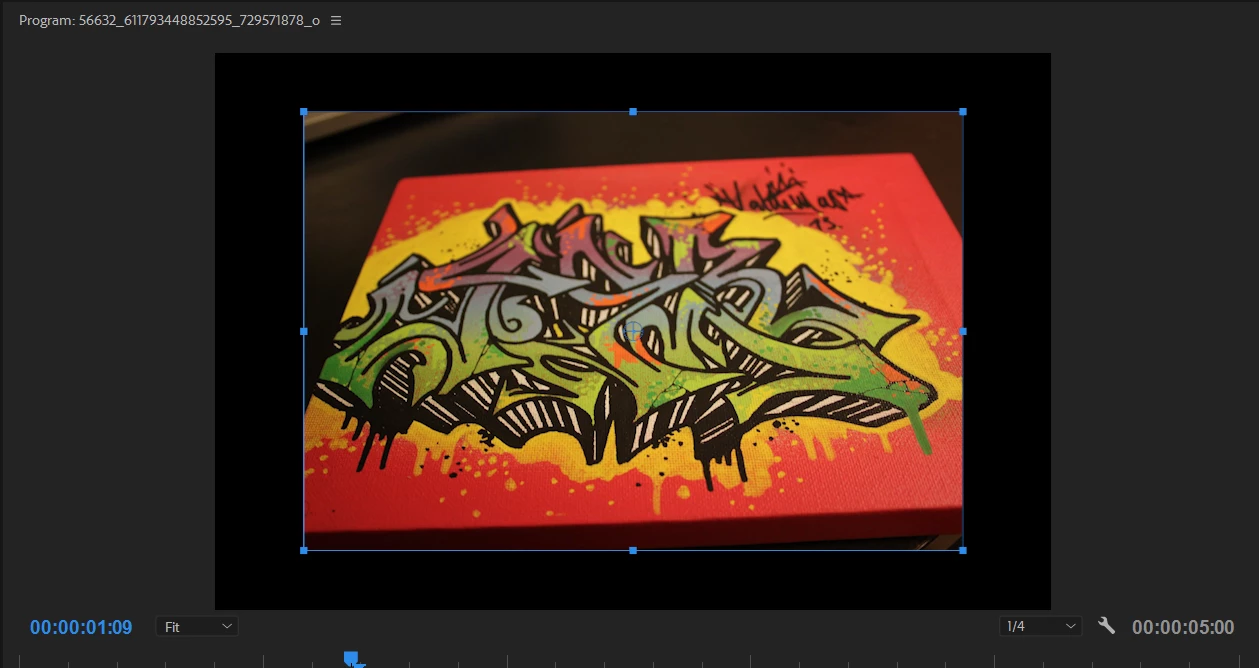
I have Premiere Pro installed on two computers. The older version has this blue outline on both video, text, and other objects while the newer version doesn't. The center "magnetic" alignment also seems to have disappeared from the newer version. Is there any setting I can change to get this feature back? I'm jumping back and forth between version 13.0.2 and v.12.1.2
This topic has been closed for replies.
Correct answer Ann Bens

Was not clear to me I was looking at previous version.

I thought you wanted all assets show at the same time.

Reset workspace or enlarge or shrink the program monitor manually.

1 reply

Ann Bens
Community Expert
Community Expert
February 1, 2019

If you want outerlines you will have to select the text first.

Center alignment is under the wrench: snap graphics.

VladJenkoAuthor
Participant
February 1, 2019

As said, the outer outlines are showing in the previous version, but not in the newer (for me). The image attached shows me moving a photo with the outlines while in the newer version even if I click and drag it - there isn't any. That's what I'm asking for help for with.

Even when clicking and changing the text I can't see where the vertical line splits between the letters. I find this to be very odd.

Ann Bens
Community Expert
Ann BensCommunity ExpertCorrect answer
Community Expert
February 1, 2019

Was not clear to me I was looking at previous version.

I thought you wanted all assets show at the same time.

Reset workspace or enlarge or shrink the program monitor manually.