Known Participant
November 3, 2018
Question

Branched [Was Re: Losing still image quality after premiere pro export]

  • November 3, 2018
  • 2 replies
  • 1788 views

Hello,

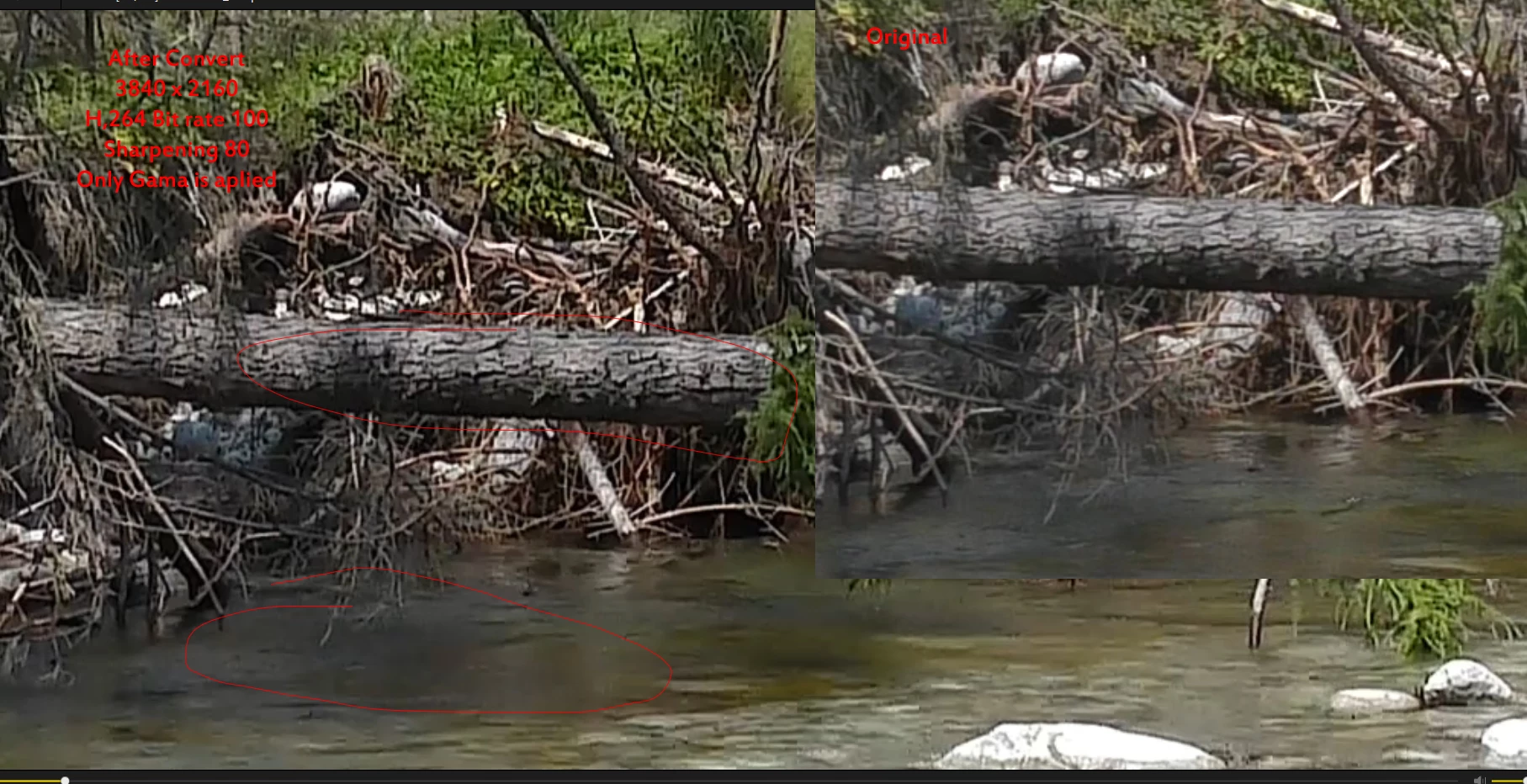
I can do anythink, but also I can’t reach quality of original video. Look in attachement. Water is terrible. I had try lot of combination export settings, but still lose quality.  I am converting UHD video without scaling. What Can I do?I dont want devaluate more videos.
    This topic has been closed for replies.

    2 replies

    Known Participant
    November 3, 2018

    Because 90 percent of videos I convert with optical flow for smoothness.for this i need 50 p .should I leave 25p?

    Can be this quality problem with poor graphic card amd 6670?

    Thanks

    Ann Bens
    Community Expert
    Community Expert
    November 4, 2018

    Graphics card has nothing to do with with quality of the footage.

    If your footage is 25p then edit in 25p and export to 25p.

    Which camera was used?

    Known Participant
    November 4, 2018

    I had Panas HCVX980, now I have Sony FDR AX 53 (good stabilization)

    My dream is 4K/50P camera.

    Ok but Optical flow with 25P is no motion change, with 50P it is super, smooty.

    For quality test I had try with 25P export - same quality lose.

    I can upload video, is short, If you want try convert?

    Thanks

    Ann Bens
    Community Expert
    Community Expert
    November 3, 2018

    Please post sequence settings, clip properties and export settings with left tab to output and visible image.

    And turn off Sharpening.

    The original does not look udh.

    Known Participant
    November 3, 2018

    Clip:

    File Path: K:\fotoC\dvd32\video2016D\376PODBANSKE\S3760001.MP4
    Type: MPEG Movie
    File Size: 60,81 MB
    Image Size: 3840 x 2160
    Frame Rate: 25,00
    Source Audio Format: 48000 Hz - compressed - Stereo
    Project Audio Format: 48000 Hz - 32 bit floating point - Stereo
    Total Duration: 00:00:08:04
    Pixel Aspect Ratio: 1,0
    VR Projection: None

    Sequence settings:

    Export:

    I had try also Frame sampling,or optical flow, the same

    Ann Bens
    Community Expert
    Community Expert
    November 3, 2018

    Optical flow is used when output has a different framerate as the input.

    If you framerate is 25 why use a sequence that is 50?