
Known Participant
September 2, 2024
Question

BRAW not importable in Premiere Pro

  • September 2, 2024
  • 2 replies
  • 249 views

Even after installing the Adobe Plugin for Blackmagic RAW (and restarting everything), when I import my braw files into Adobe, Adobe comes with the message, that I need the Plug-in, leading me to everything I have already done. 
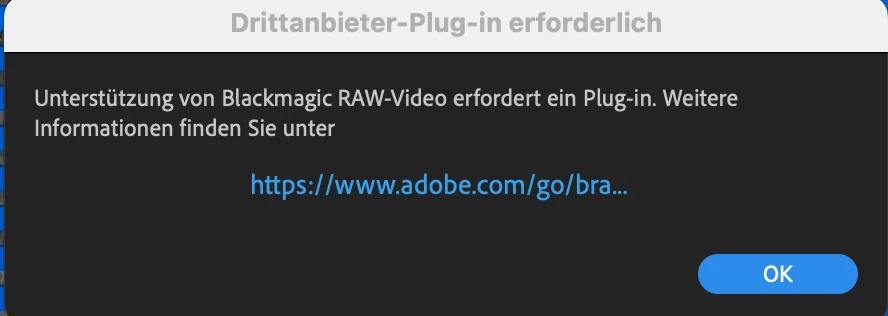


Although after clicking okay, the files to actually import and I can edit them in Premiere. Why is it like this? Is this a mistake or can I really not edit with the imported braw? 


I am working with Premiere 24.6.1 and the plugin is also the latest (Blackmagic RAW 4.2: https://www.blackmagicdesign.com/event/blackmagicrawinstaller). My macbook is on Ventura 13.6.7.


I'd be very glad for anyone's help and insight :)!

2 replies

R Neil Haugen
Legend
July 22, 2025

Long-time BRAW person here ... and experienced both in Pr and in Resolve. Multiple BM cameras shooting mostly in BRAW.


Hokay ... like Kevin says, the Autokroma freebie plugin is for most far more reliable than the one from BlackMagic ... which in my experience was worth exactly what I paid for it.


Autokroma actually provides better support on their website for the BM plug-in than BlackMagic does. So check their site out for BM BRAW plug-in issues.


That said, I went ahead and bought the paid BRAW Studio from Autokroma. It's always solid, supported, and has great options like presets that I use a lot. Doesn't cost much.

Everyone's mileage always varies ...
Kevin J. Monahan Jr.
Community Manager
Community Manager
July 22, 2025

Hey there,

I read your case. It sounds like others are also experiencing this issue. Sorry about that. Adobe does not make this plug-in, so what does BMD support say? Let the community know. You might try the free plug-in from Autokroma, as well. Users have reported better success there, as of late. Let us know what works.


Thanks,
Kevin


Kevin Monahan - Sr. Community and Engagement Strategist – Adobe Pro Video and Audio