Question
Brightness changes on master clip after lower thirds animation ends
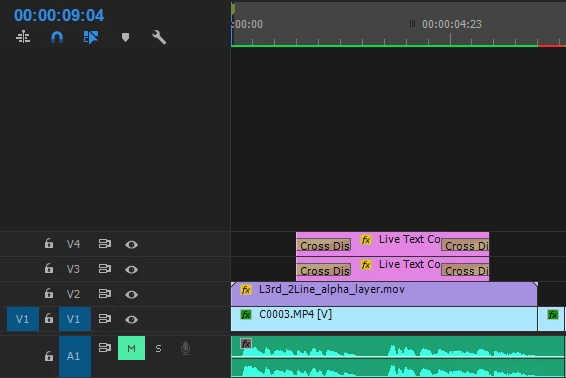
In the above image, the bottom video is an interview clip, while the top three layers are a lower third. At the exact point in playback when the lower third animation finishes, the interview clip gets very slightly darker. It is seemingly a problem with the second (alpha) layer. The lower third animation was copied and pasted from another project - I did not create it. What can be the problem?
That cut in the master clip is my own, in an attempt to fix the brightness manually.
EDIT - I found a cheat around this, which is to just move the lower thirds a few frames to the right, so the cutoff is a natural cut, anyway. But I may still need to know how this happens for future edits. Thanks for any advice.
 AdChoices