valeriob28655130
Participant
April 5, 2018
Question

BUG Premiere: Any Imported Video is "Messed Up"

  • April 5, 2018
  • 5 replies
  • 1907 views

Hi there,

I'm having this issue, out of the blue (everything was working fine until a few days ago): every kind (tried several types) of video I import is not imported properly, like in image example below. Even after I export the video the issue persists. I can play just fine such video on VLC (so the issue is in Premiere).

I already tried to uninstall and re-install, purge the cache, reset the preferences but nothing helped.

I'm using Adobe Premiere Pro CC v12.0 on Windows 10.
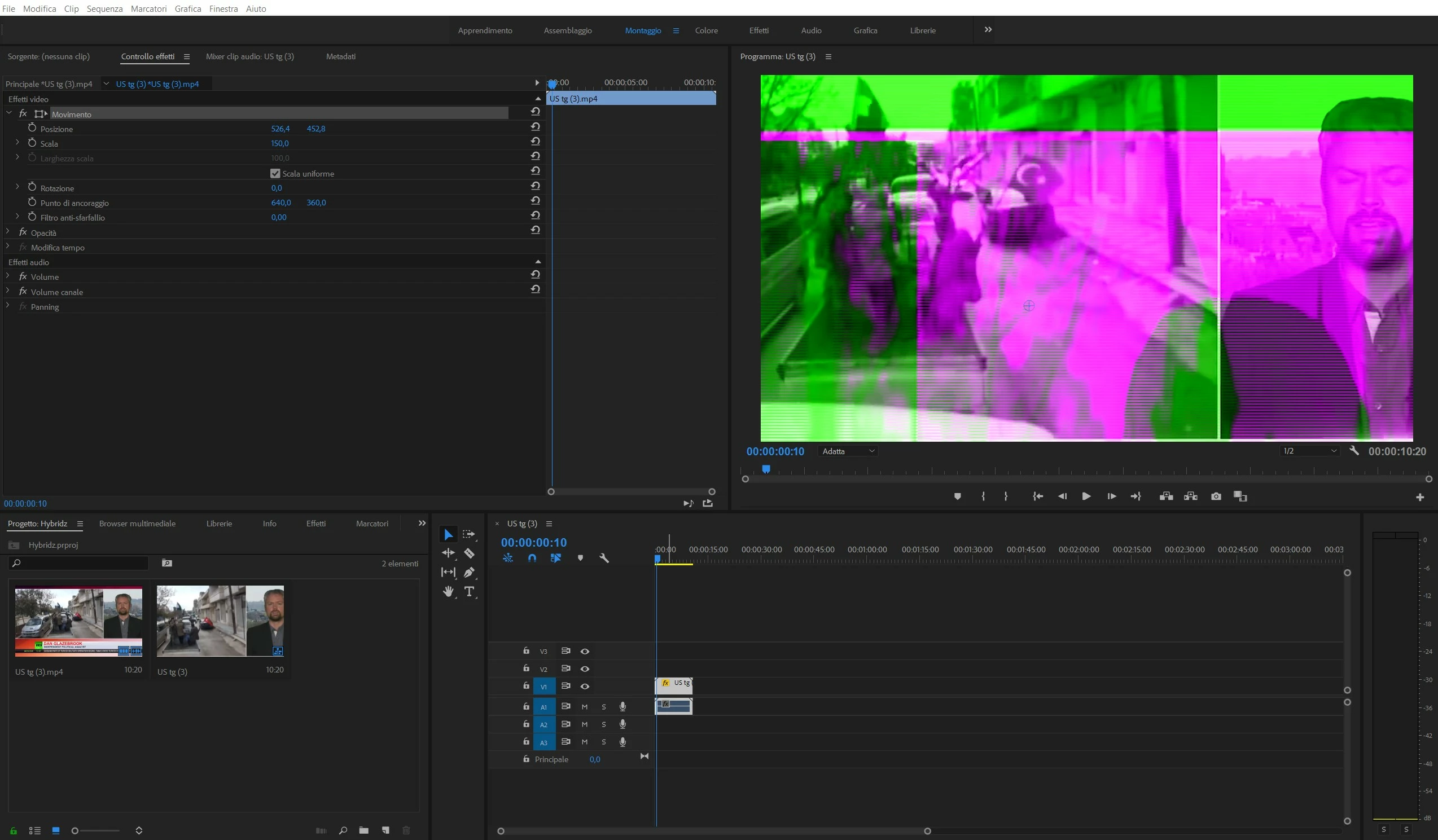
Thanks in advance for your help.

This topic has been closed for replies.

5 replies

Ann Bens
Community Expert
Community Expert
February 10, 2019
Participant
February 10, 2019

I’m having the exact same issues - how is this fixed?

R Neil Haugen
Legend
February 10, 2019

There are several things discussed in this thread so I don't have a clue what issues you're having, please provide a decently detailed explanation.

Neil

Everyone's mileage always varies ...
Kevin J. Monahan Jr.
Legend
May 14, 2018

Hi ValerioB,

Still having this issue? Let us know.

Thanks,
Kevin

Kevin Monahan - Sr. Community and Engagement Strategist – Adobe Pro Video and Audio
Participant
September 16, 2020

I am having a issue even crazier then this. All footage is static. Even when exported the video is static. When I close the program and open a new project it is static. All the footage is perfect outside of premiere pro. 


Please help!


I attached an image.

Ann Bens
Community Expert
Community Expert
September 16, 2020

Solution has been given many times; update gpu driver.

Participant
April 12, 2018

I am having the same issues which started coming across only after updating to the latest version (12.1.0). A number of bugs seem to appear everytime I launch Premiere, and regardless of restarting the system or reinstalling the software altogether.

The bugs found are as follows:

- project splash screen does not display recent projects and side buttons do not respond to clicking them

- upon playback of a loaded project timeline no sound will play unless a track is muted and then unmuted

- clips glitch out in the same manner as @valeriob28655130 reported, particularly when the clip in question is overlaid on top of another clip and then trimmed or adjusted along the timeline

Ann Bens
Community Expert
Community Expert
April 12, 2018

Try resetting preferences.

Ann Bens
Community Expert
Community Expert
April 5, 2018

Update to 2018.1.0 and or update (reinstall) videodriver.

valeriob28655130
Participant
April 5, 2018

Hi Ann,

thanks for your answer. I tried to follow both your advice but the issue still persists.