Camera shot report doe not show shot details
I am currently doing a Diploma in Photography and Photo Images and the module I am using adobe Story for is called Moving Images.
I have created a script where I setup scene shots, using shot within the script editor. However I have been having issues trying to produce a shot report based on the information setup in the script, a list of shots that show CU - CAMERA 1 - HAND HELD. I am required to supply a shot list stating shot number, shot type camera movement and shot angles.
The shot pull down menu does not allow me to set up a shot, that show a close up at low angle, will allow low angle on it own, but wont allow to stipulate that its a closeup or do you need to do CU/LOW ANGLE - CAMERA 1 - HAND HELD
The Camera shot method produces a camera shot cards, alright but the dialog box needs further explaining as the adobe.helpx for this feature is very vague, as what to you put in the VFX, input box, what do you put in Camera input box and Position what do you put into that. Description is quite easy to understand, but it would be nice to be able to include all things from the script.
Camera Shot dialog box looks like this
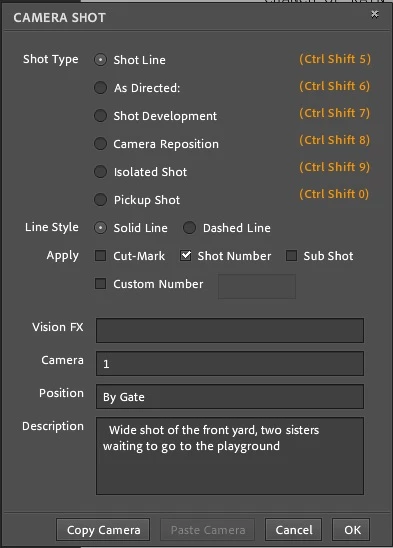
I think this need more explaining in the adobe help pages.
I have printed off, the help pages and read through them, and tried to find tutorials to explain this. All the tutorials I have watched suggests not to use Camera Shot, as it mucks up the script timing and only use shot in the script editor, as it does not stuff up the timing. However I cannot generate a shot list from that.
Can someone please advise me on this, as its important to me as I am using it for my Diploma course Assignment which is due Sunday 9th July 17 At 11pm. Australian time.
 AdChoices