
Participant
April 30, 2021
Question

Camtasia AVI export clipped when importing to premier pro

  • April 30, 2021
  • 3 replies
  • 1323 views

Good morning,


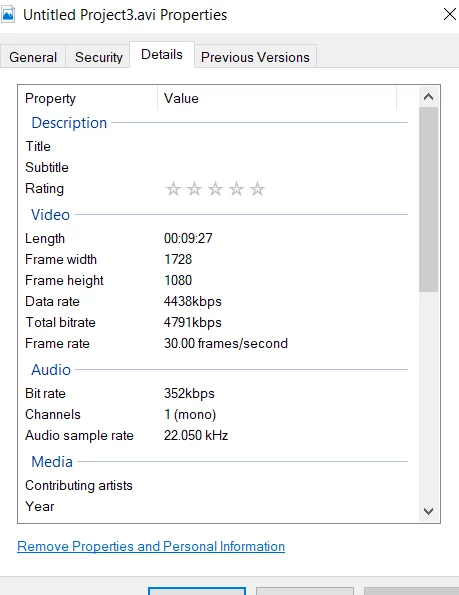
I've brought in a screencast AVI file from Camtasia which is 9 mins length. Premiere Pro only seems to recognise this as a 2 min clip.


  • exported file is 9 mins length in windows media player
  • exported as AVI from Camtasia.
  • 30fps
  • attached some video settings below.


Has anyone else experienced this & knows a fix? Wondering if it's something in Camtasias export settings.


I was thinking I could try re-encode with media encoder but it pulls in a 2 min file as well.


Thank you for the assistance.


This topic has been closed for replies.

3 replies

Jeff Evans
Participating Frequently
November 4, 2021

I have exactly the same problem. Any solution?  Teh clip when reloaded into Camtasia is fine so something about PremierPro only recognizing the first 2 min and 20 sec.  Thanks

Ann Bens
Community Expert
Community Expert
November 5, 2021

The solution is to use a different codec.

Ann Bens
Community Expert
Community Expert
May 8, 2021

I find the Lagarith codecdoes a better job the techsmith codec.


https://lags.leetcode.net/codec.html


Community Manager
May 8, 2021

Hi there,


We're sorry about the poor experience. We can get this checked. If possible, please share a download link for the sample media with which you are experiencing the issue. It will help us to test the issue at our end.


Thanks,

Sumeet