

willmen08
Participating Frequently
January 9, 2020
Answered

Can a vignette be moved from the center?

  • January 9, 2020
  • 1 reply
  • 2391 views

Hello again,


I've tried several things to try to move the vignette from the center to no avail. In the Lumetri settings there's no option for that, I tried masking an area thinking the vignette would move with it, but it doesn't. And I've tried creating an Adjustment layer and moving that and for some strange reason the vignette stays in the center even when I move the entrie Adjustment layer's position - so weird.


Can someone show me how to create a vignette that's NOT in the center of the frame?


Thanks,

Will


iMac late 2015, Retina 5k 27"

High Sierra, 10.13.6

4GHz Intel Core i7

AMD Radeon R9 M395X 4096MB

32gb DDR3 Ram, 512 SSD
This topic has been closed for replies.
Correct answer Meg The Dog

One way:

Go to File > New >  Black Video and create a clip of black video.

Place that clip of black video above the clip you want to vignette.

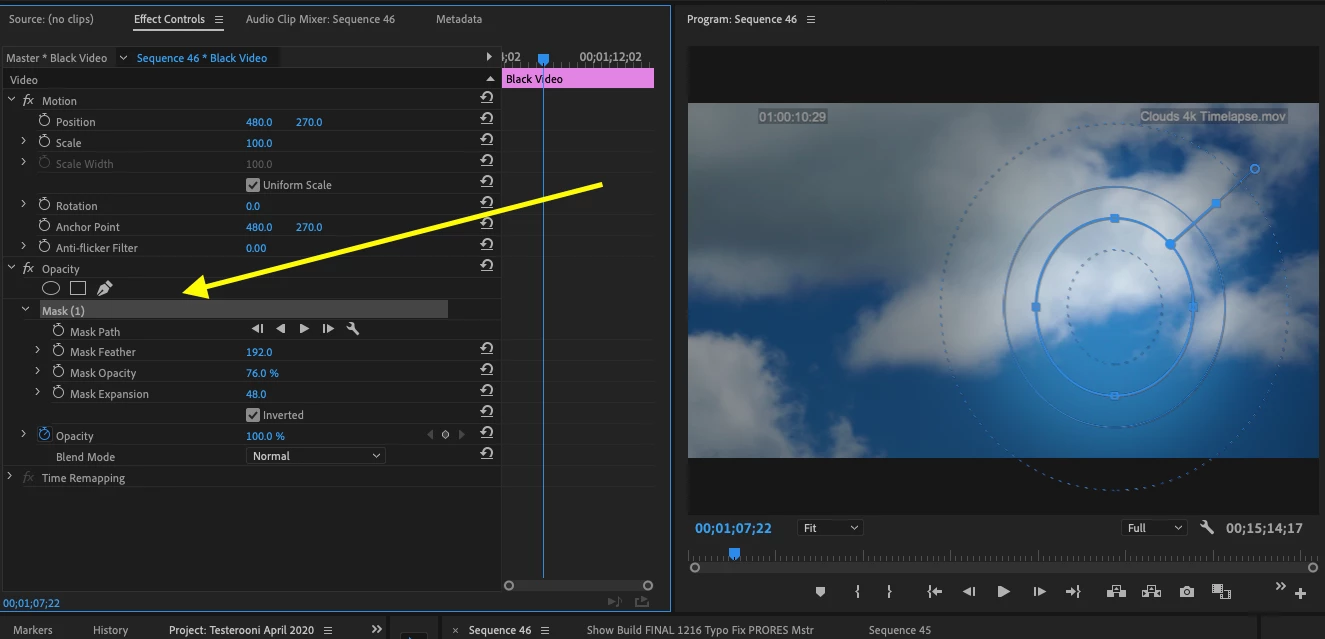
Apply an inverted mask where you want in frame to the black video clip and adjust Mask Opacity to vary the density of the vignette:

MtD

1 reply

Meg The DogCorrect answer
Inspiring
January 9, 2020

One way:

Go to File > New >  Black Video and create a clip of black video.

Place that clip of black video above the clip you want to vignette.

Apply an inverted mask where you want in frame to the black video clip and adjust Mask Opacity to vary the density of the vignette:

MtD

willmen08
willmen08Author
Participating Frequently
January 9, 2020

Perfect - thanks.


Adobe should allow you to move the vignette around (Like you can in Final Cut).


Thanks again,

Will

Kevin J. Monahan Jr.
Community Manager
Community Manager
January 9, 2020

Hi CS,

You can make that request here: https://adobe-video.uservoice.com/forums/911233-premiere-pro


Thanks,
Kevin

Kevin Monahan - Sr. Community and Engagement Strategist – Adobe Pro Video and Audio