
drawsd97462479
Participant
October 1, 2023
Question

Can I drag text styles, animation presets, and sound effects all at once in Pr or Ae?

  • October 1, 2023
  • 3 replies
  • 514 views

My daily work looks like this:


My process for creating text animation is:
1. Upgrade captions to graphics.
2. Drag text styles.
3. Drag animation presets.
4. Drag sound effects into the timeline.

I work on projects that require a lot of text animation, with varying text styles, animations, and sound effects. It's incredibly time-consuming to make them, and it's driving me crazy! 🤯😭😭

So I'm wondering - are there any shortcuts, plugins, or scripts that can apply text styles, animation presets, and sound effects to objects(graphics) all at once? I'm open to solutions in either Premiere Pro or After Effects (though I'm more familiar with Premiere).


What I need like this:
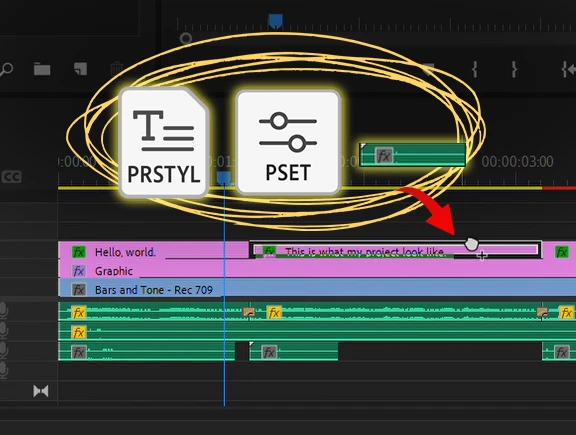
(☝️Drag text styles, animation presets, and sound effects into the timeline all at once)


I'm also willing to learn if it requires coding (like Python).
Please help! Any suggestions would be greatly appreciated.


This topic has been closed for replies.

3 replies

AnnikaKoenig
Legend
January 3, 2024

How big is your collection of text styles and animation presets you pull from? You could build a Mogrt in After Effects that uses a dropdown control to switch between the different animations and one for the styles.

Unfortunately, Mogrts currently do not support switching audio (yet). Also, the Ae Mogrts might render/export slower than your Premiere graphics. And you also don't have the integration with captions in the same way Premiere graphics has.

R Neil Haugen
Legend
October 17, 2023

I would suggest checking out aescripts.com.


It is more "based" in AfterEffects than Premiere but many of the plug-ins there work in both.


And it's a great resource for animating tools for about anything.

Everyone's mileage always varies ...
Kevin J. Monahan Jr.
Community Manager
Community Manager
October 17, 2023

Hi @drawsd97462479,

I got your message. Thanks so much for the response. I apologize that the community was unable to solve your issue. At this time, please contact assisted support directly to help you find a solution to this problem. The chat pod is in the lower-right corner of the screen there. Ask for the “video queue” to reach our digital video specialists. I hope they can help you. Let us know what they say so that the community can stay informed and help others having trouble with the same situation.


Thanks,
Kevin

Kevin Monahan - Sr. Community and Engagement Strategist – Adobe Pro Video and Audio