
Known Participant
July 30, 2023
Answered

Can I get the warp stabilizer to ignore areas during its analysis?

  • July 30, 2023
  • 2 replies
  • 576 views

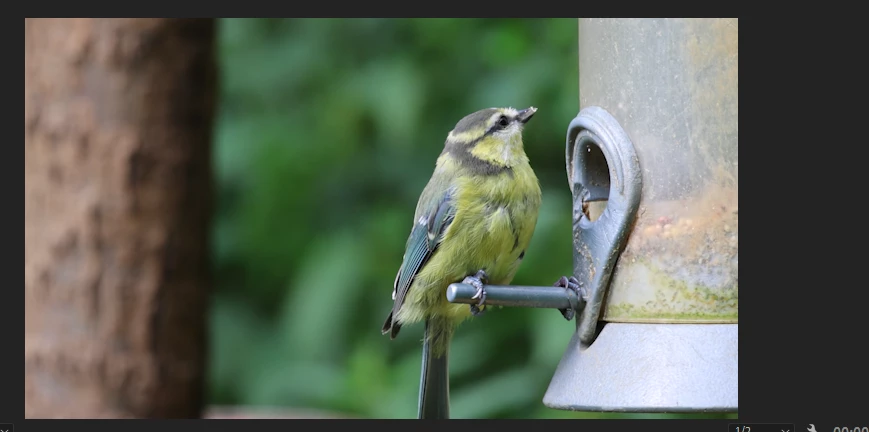
I filmed a bird on a feeder. To eliminate a bit of camera shake, I am using the Warp Stabiliser.  The problem I have is that the feeder was gently swaying. The result I get is a stationary bird feeder and the background gently swaying. Is there a technique to get the stabiliser effect to ignore the foreground? 
 

This topic has been closed for replies.
Correct answer Ann Bens

No you cannot assign certain areas in Premiere you can in After Effect.


trial and error:

Mask out the tree, invert, make it stationary by d.g. Hold Frame or even use a still from the tree.

Mask out the tree, invert, nest, apply WS to nest.


2 replies

Ann Bens
Community Expert
Ann BensCommunity ExpertCorrect answer
Community Expert
July 30, 2023

No you cannot assign certain areas in Premiere you can in After Effect.


trial and error:

Mask out the tree, invert, make it stationary by d.g. Hold Frame or even use a still from the tree.

Mask out the tree, invert, nest, apply WS to nest.


Known Participant
July 30, 2023

Thank you. I was hoping not to involve AE as I have only just started learning it, but I think you have confirmed my fears that it is probably the only way.  At least its a good learning exercise.

Peru Bob
Community Expert
Community Expert
July 30, 2023

Have you tried all the different settings?

Known Participant
July 30, 2023

Not every single permutation, but I tried all the stabilization methods, plus some of the other options which I felt might have made a difference.