CineChopper
Participant
February 2, 2025
Answered

Can I have videos/photos, beat edit2 and captions in my "one click slideshow" in automation blocks?

  • February 2, 2025
  • 1 reply
  • 233 views

Hello!


Love automation blocks!


Is it possible to have also videos and photos, or only videos in the "one click slide show?" If so how exactly?


Is it possible to automatically intitialize beat edit in the one click slide show? 


is it possible to us automation blocks to automatically generate captions?


And finally is it possible to take data from a googlesheet and google drive and have premiere automatically trigger the one click slide show using the text data and images and music ? (or another way to make this work?)

Thanks so much!

Chris

 

Correct answer Mathias Moehl

Great to hear that Automation Blocks is so useful for you!

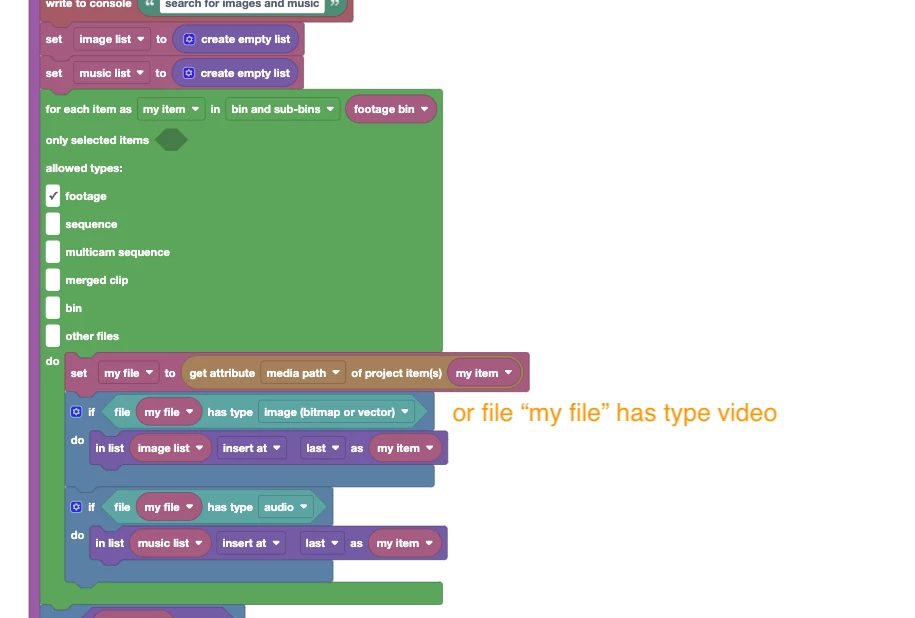
If you open the block code of the slideshow ("right click->expand" on the block with the implementation) you find this section, which finds all images and music files in the folder. You can easily extend it such that it also finds videos using an "or" block and second copy of the "file has type" block:


Scripts in general and hence also Automation Blocks can neither remote-operate BeatEdit nor create captions, unfortunatly.  What you could do is first run BeatEdit manually and then write a script which loops over the markers and inserts a clip at each of them. But currently we have no ready to use script for that.

Also note that although they are muchmore basic than BeatEdit, also Automation Blocks has some tools to create beat markers. So if you need a fully automated method, you could also ask the user to enter a bpm and then let Automation Blocks create the markers based on that.

1 reply

Mathias Moehl
Community Expert
Mathias MoehlCommunity ExpertCorrect answer
Community Expert
February 2, 2025

Great to hear that Automation Blocks is so useful for you!

If you open the block code of the slideshow ("right click->expand" on the block with the implementation) you find this section, which finds all images and music files in the folder. You can easily extend it such that it also finds videos using an "or" block and second copy of the "file has type" block:


Scripts in general and hence also Automation Blocks can neither remote-operate BeatEdit nor create captions, unfortunatly.  What you could do is first run BeatEdit manually and then write a script which loops over the markers and inserts a clip at each of them. But currently we have no ready to use script for that.

Also note that although they are muchmore basic than BeatEdit, also Automation Blocks has some tools to create beat markers. So if you need a fully automated method, you could also ask the user to enter a bpm and then let Automation Blocks create the markers based on that.

Mathias Möhl - Developer of tools like BeatEdit and Automation Blocks for Premiere Pro and After Effects