Can I make a multicam sequence with individual overlays for each camera without rendering each one?
I apologize if this has been asked before. I searched for a couple hours for a solution before posting.
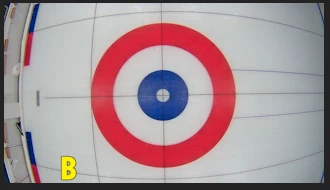
I'm editing a curling match together to add commentary at a later date. The curling club has cameras on the ice, and I have 4 different camera angles that I want to edit into a broadcast style video. I've figured out syncing and using these 4 cameras in a multicam sequence already, but there is a cosmetic problem that I'd like to fix. The overhead camera on each house (the target area) has an overlay denoting which sheet of ice it belongs to that is part of the video I receive and can't be removed. This is for the "B" sheet:
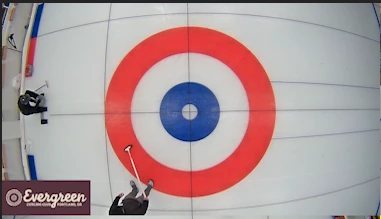
My solution is relatively simple. The "B" is in a part of the screen that doesn't have important action. So I just want to overlay a logo of the curling club over that part of the screen like so:
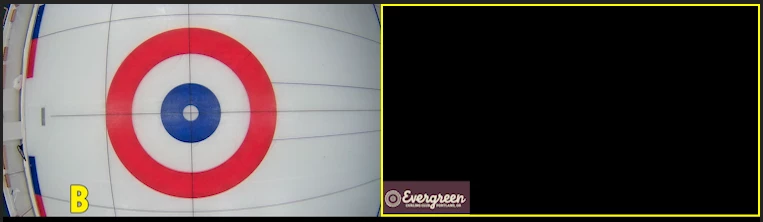
I can create a .png file with the appropriate size, and pop it into a sequence without issue if I only had one camera, but when I'm trying to use multicam, I can't seem to add the overlay without it splitting the .png logo as its own camera:
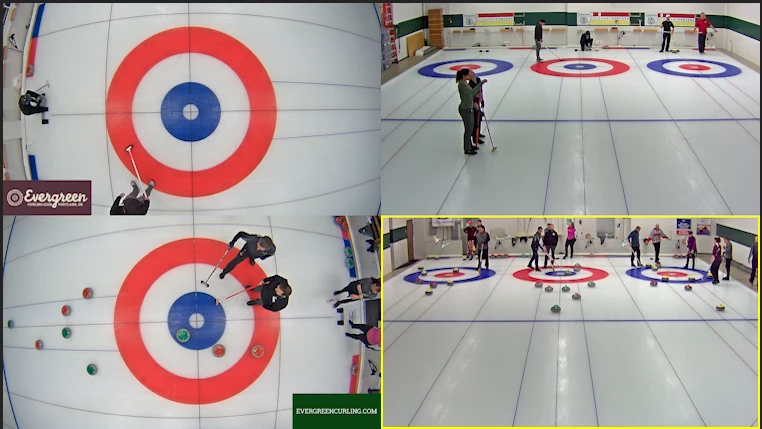
I can, of course, render every sequence with the overlay and import them as clips, but each one of the four videos are 2 hours long, and rendering on my moderately spec'd desktop takes about 45 min - 1 hr for each of the two cameras I want overlays. The overlays unfortunately won't work on every camera, and trying to splice them into a finished multicam edit would take much longer to line up to all the camera changes, at least as far as I can figure. Below is part of a multicam edit I did after rendering overlays onto two of the camera clips to give you an idea of the whole picture.
This seems like something that there should be a more elegant solution for. Am I missing something, or am I just stuck rendering the sequences before using them in a multicam edit?
Thanks for your help.
Sarah
 AdChoices