

Bed30321077z973
Inspiring
November 10, 2025
Question

Can I perma Alter/reduce the volume of an AUDIO TRACK? (so new clips there are always affected?)

  • November 10, 2025
  • 2 replies
  • 187 views

Hello,

I am not sure if I have already asked about this, it seems a question I might have wanted the answer for but I don't recall any method to do it so perhaps not,

I would like to know if it's possible to permanently reduce or alter the volume of an audio track?

I know we have the MUTE button for it, but I want to change the volume of that audio track forever (in my project) until I remove that option.

And that would work for any clips on that audio track, new items or not, 

it MUST WORK LIKE THE MUTE BUTTON but instead alter the volume (up or down) (amplify effect I guess)

I just want it to stay and not apply it again and again on new clips
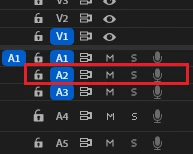
For example on that track.

2 replies

Averdahl
Community Expert
Community Expert
November 10, 2025

Use the Audio Track Mixer. 


Bed30321077z973
Inspiring
November 10, 2025

I saw that earlier and was not sure how to handle it.I simply drag the white rectangle up and down?

Averdahl
Community Expert
Community Expert
November 10, 2025

Yes, thats all you have to do. If you want to set it back to 0 you can just double click on it.

quote

I saw that earlier and was not sure how to handle it.I simply drag the white rectangle up and down?


By @Bed30321077z973
Inspiring
November 10, 2025

Simply pull the track audio fader down to -12 dB or whatever you want.

Bed30321077z973
Inspiring
November 10, 2025

Not sure what's that? Its the Audio Track Mixer thing?