elliottlemberger
Participant
February 25, 2017
Answered

Can not group clips

  • February 25, 2017
  • 2 replies
  • 7692 views

Seems like there should be a really obvious answer to this, but I can't find one.

I can't get grouping of clips to work.

I select multiple clips, hit Command + G

I know it's grouping them on some level because if I select the Clips dropdown the option is now "Ungroup"

However, having them grouped doesn't seem to do anything.

I believe I should be able to select and move one and the other grouped clip(s) will also select and move, but this isn't happening! I select one after grouping, and only the one gets selected, and if I move it, only that clips moves.

It's making me crazy!

Is there anything obvious that could be causing my clips to not link??

I've tried audio + video clips, audio+audio, video+video clips. Tried grouping 2 clips and tried with large groups as well.

Nothing works!

Also not sure about the difference between Link and Group, but have tried Link as well for any combination of clips I can think of, and nothing works at all.

Thanks in advance for any help!
This topic has been closed for replies.
Correct answer Meg The Dog

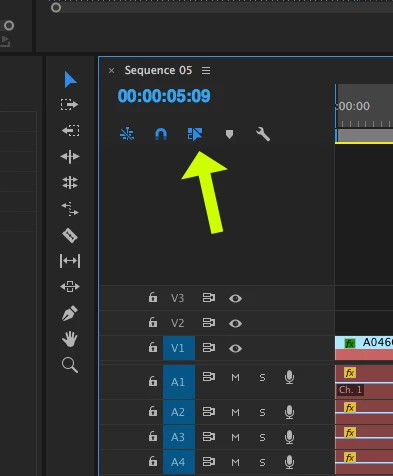
Toggle on Linked Selection by clicking this button (it will turn blue when on) to get the timeline to respect clip linking and grouping status.

MtD

2 replies

Ann Bens
Community Expert
Community Expert
February 25, 2017

You can group clips together on the timeline but you wont see anything happening until you move one of the clips.

If you want to have some sort of reference change the label color of those grouped clips.

Same goes for linking and unlinking video and audio.

Meg The DogCorrect answer
Inspiring
February 25, 2017

Toggle on Linked Selection by clicking this button (it will turn blue when on) to get the timeline to respect clip linking and grouping status.

MtD

elliottlemberger
Participant
February 25, 2017

Unbelievable... I knew it was something incredibly simple. Surprised I couldn't find this answer anywhere else, but thank you MTD!